


Export Tool

Purchased new laptop. Used export tool in Thunderbird to external HD. Traded in old laptop. Installed Thunderbird & attempted to import my email profile. Import tool requires zip file, but the only file on my external HD is a .default file. I'm getting new email but none of my old emails. Consulted Best Buy Geek & he determined the import tool didn't work properly because the export was missing required files. We further determined the export backup must not have worked properly.
Valgt løsning
Just to follow on to RIck's guidance, I'll add my two cents...
My preference for IMAP is that I can use phone or another PC and access all the messages, both incoming and outgoing. This also protects me from losing messages if the PC gets trashed.
For your POP, I suggest looking at your old proflle's Mail folder. In that will be your POP account folder. In that will be your inbox and sent folder. IF those messages are in your new POP account, try this: - with the Importexporttools NG addon installed, highlight Local Folders, rightclick, and select the importexport option to import mbox, and select the input file in the old profile (IGNORE the msf entry). Now, open the folder, select all messages and COPY (not move) to the POP account's inbox. then repeat for the sent folder. then delete the two folders you created in Local Folders.
Læs dette svar i sammenhæng 👍 0Alle svar (11)
Are you using windows? If so, upzip the file and post screenshot of the unzipped folder and we will attempt to support you in recovering the content. Thanks.

Billy Breeden said
Purchased new laptop. Used export tool in Thunderbird to external HD. Traded in old laptop. Installed Thunderbird & attempted to import my email profile. Import tool requires zip file, but the only file on my external HD is a .default file. I'm getting new email but none of my old emails. Consulted Best Buy Geek & he determined the import tool didn't work properly because the export was missing required files. We further determined the export backup must not have worked properly.
The presence of .default suggests that the zipped file was unzipped. That is why Thunderbird cannot import, not because files are missing. At least as far as we know now.
You called the .default thing a file. Is it a file or a folder?
Thanks. Just wanted to clarify. So you don't have to unzip a file.
Now we need to know if you have anything in your current profile (the one with the account that is getting new messages but does not have your old messages) that must be retained or transferred. Apparently, you set up your account(s) in a new profile. (Or was only part of your old profile somehow imported?) Are any accounts that you set up in your new profile IMAP or POP accounts? If any are POP accounts, do you have them leave messages on the server? Do you have any local folders in your new profile?
Or do you already know that all you need is to use your old profile?
In any case, the first thing to do is to close Thunderbird, then copy that .default folder to your Thunderbird/Profiles folder. You can find your Thunderbird/Profiles folder by using the ≡ button at top right > Help > Troubleshooting information > Profile Folder > Find in [...].
After copying, open Thunderbird and tell it to use that profile by using the ≡ button at top right > Help > Troubleshooting information > about:profiles and setting that copied profile as the default. Then re-start Thunderbird.
If you need something from that interim profile, let us know what and we can guide you.
Hey David. The exported folder was not zipped, but I opened it & attached a pic of the files
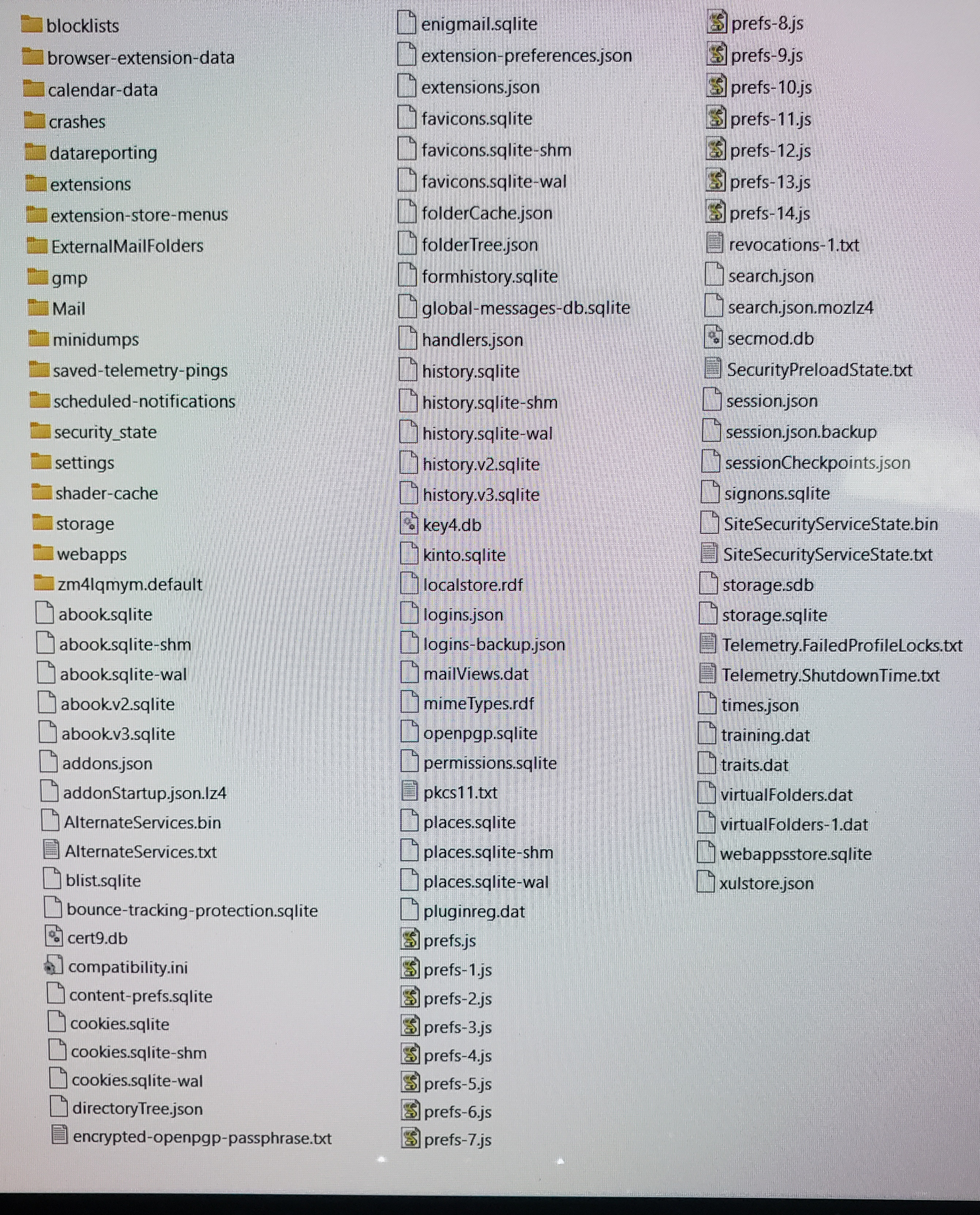
David, several prefs files. You know better than I do what to do about them.
It looks like a complete profile with no IMAP accounts. The prefs.js file is good if it is the one with latest update. If that's the case, the others can be deleted. If not, locate the highest numbered prefs and rename it to prefs.js, removing the others. But my guess is the prefs.js is good, or you would have been having other problems.
A reminder: following RIck's instructions about help>troubleshootinginformation and locating the profile, Remember to CLOSE thunderbird prior to Rick's next instructions to paste in the new profile. That's in Rick's instructions but are sometimes overlooke when doing the copying and pasting.
Hey guys. Rick - I believe the old profile is all I need. After looking at the multiple profiles I have the only one with a full compliment of files is the profile I'm using. David - I closed Thunderbird before copying the profile into the windows/users/billy/appdata/roaming/thunderbird/profiles folder.
I'm rcving emails but still have none of my old emails. I think I'm just stuck with what I have. Not the end of the world.
Thanks so much for your help, guys.
I do have another question. When I first installed Thunderbird & prompted to pick between imap & pop, I selected pop. Should I have gone with imap?
Billy Breeden said
I'm rcving emails but still have none of my old emails. I think I'm just stuck with what I have. Not the end of the world. [...] I do have another question. When I first installed Thunderbird & prompted to pick between imap & pop, I selected pop. Should I have gone with imap?
That is why I asked:
Are any accounts that you set up in your new profile IMAP or POP accounts? If any are POP accounts, do you have them leave messages on the server?
If you have been getting messages in a POP account without telling Thunderbird to leave them on the server, then they exist in only in that Thunderbird account in one profile.
Let's make sure that everything is clear. Let's call Profile 1 your old profile that you have now recovered and are using as the default profile. Let's call Profile 2 the profile that you were using temporarily.
Did you set up a POP account in Profile 2 without having messages left on the server?
You can transfer them. But let's make sure that everything is clear first.
David is better with POP than I am. But copying the file that you need is simple.
For deciding whether to use IMAP or POP: https://support.mozilla.org/en-US/kb/imap-synchronization https://support.mozilla.org/en-US/kb/switch-pop-imap-account
Valgt løsning
Just to follow on to RIck's guidance, I'll add my two cents...
My preference for IMAP is that I can use phone or another PC and access all the messages, both incoming and outgoing. This also protects me from losing messages if the PC gets trashed.
For your POP, I suggest looking at your old proflle's Mail folder. In that will be your POP account folder. In that will be your inbox and sent folder. IF those messages are in your new POP account, try this: - with the Importexporttools NG addon installed, highlight Local Folders, rightclick, and select the importexport option to import mbox, and select the input file in the old profile (IGNORE the msf entry). Now, open the folder, select all messages and COPY (not move) to the POP account's inbox. then repeat for the sent folder. then delete the two folders you created in Local Folders.
Hey guys. Apparently just creating a new account & choosing IMAP worked. All of my archives are back. All my 2025 emails are back & I'm rcving emails. Wow! I really appreciate all your help. I think I learned a few things as well. God bless y'all