


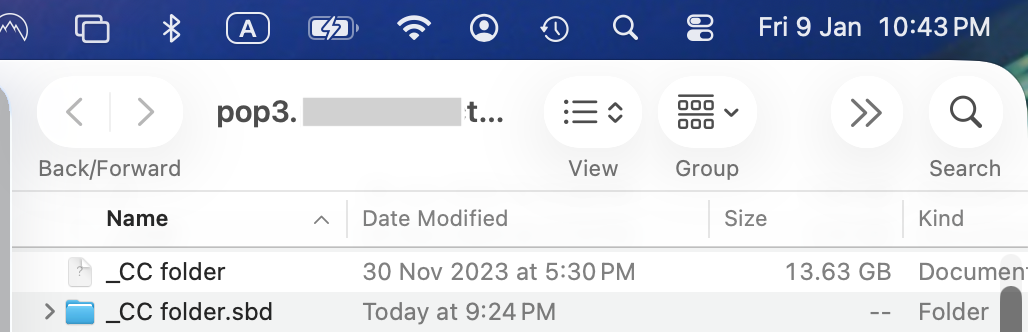
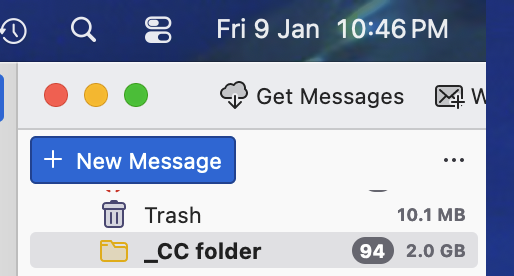
Email folder size on TB shows 3.8GB. On HDD location it is 13.63GB

an year ago on 11/25/24, I have raised this same issue https://support.mozilla.org/en-US/questions/1475852#question-reply Another user https://support.mozilla.org/en-US/user/davidsk/ replied that it is a bug ! I still have the same problem !!
My hard disk is again almost full. And it is primarily Thunderbird bloated folders.
In the MAC hard-disk, size of the many of the folders stored in local directory, are much larger that the size on TB.
For reference, On TB, "_cc folder" is 2.0 GB On Mac Finder, "_cc folder" is 13.63 GB
I have right-click the folder and press "compact". The folder on TB reduces in size. But, the folder on the Mac harddrive does not reduce in size.
Thunderbird 115.4.1 (64-bit) on macOS 26.1 Server Type : POP Mail Server
Appreciate help to get this fixed.
Thanks Attached screenshots
Valgt løsning
Did this and it has now solved the storage space problem
1) On TB, "_cc folder" -> archived all emails. And deleted the folder. 2) On Mac Finder, "_cc folder" -> deleted the folder
This has solve the issue of the storage spaces.
The emails are all safe in the archive.
Thanks
Læs dette svar i sammenhæng 👍 0Alle svar (3)
It may help to do a screenshot of the SBD folder's contents. That would have more detail. Thank you.
Valgt løsning
Did this and it has now solved the storage space problem
1) On TB, "_cc folder" -> archived all emails. And deleted the folder. 2) On Mac Finder, "_cc folder" -> deleted the folder
This has solve the issue of the storage spaces.
The emails are all safe in the archive.
Thanks