


Incorrect Folder Hierarchy
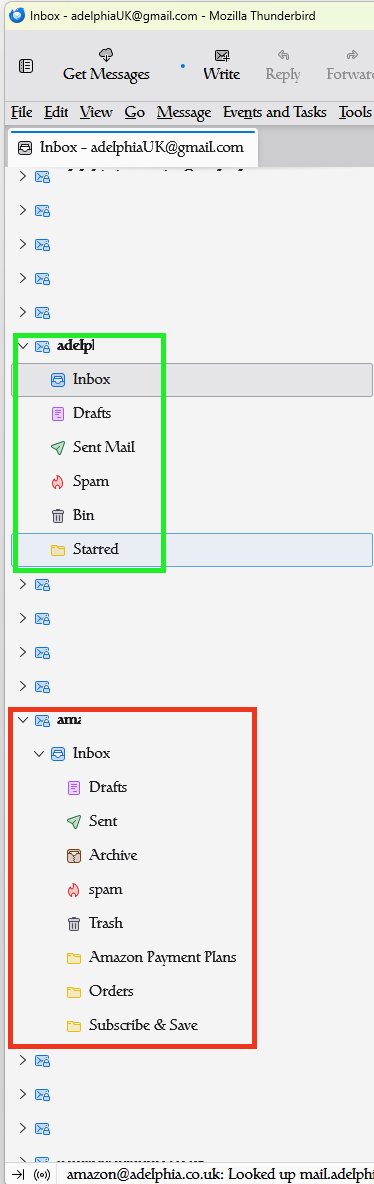
I have an issue with folder hierarchy on all my accounts within my own web server, as shown in image #1 (_ACTUAL.png).
I have checked with the SyOps of my server and they have assured me that there is no special settings or hierarchy of the folder structure, which is corroborated by image #2 (_WEBMAIL.png).
How can I correct this because, because as it stands, it just doesn't make sense; how can you have your Sent messages in your INBOX?
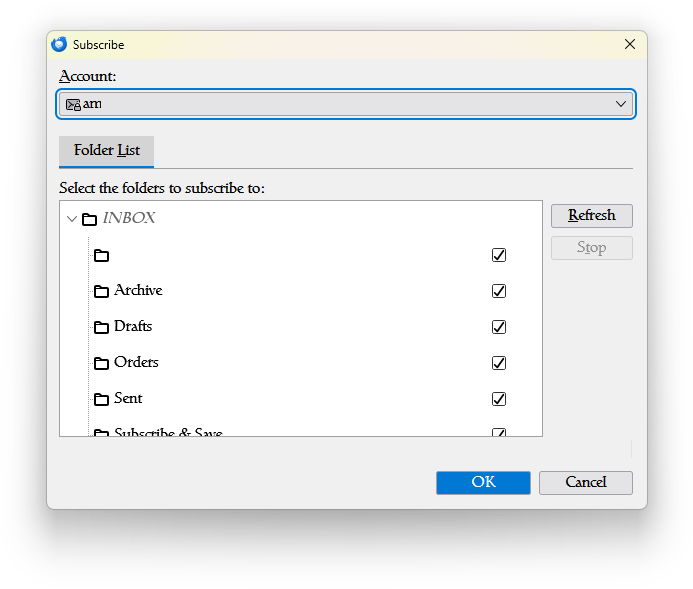
I have unsubscribed and resubscribed (I'm using IMAP BTW) to the folders and the folder list for subscription is incorrect too (see image #3, _SUBSCRIBE.png).
Has anyone had a similar issue and, if so, were you able to fix it?
If any of the TB Guru's out there have any insights into this, please feel free to share.
Thanks, as always.
adelphiaUK (Chris) Please excuse misspellings and anything that may not make sense or cause offence as the medication I take can have an adverse effect on my mind.

Valgt løsning
adelphiaUK said
I have an issue with folder hierarchy on all my accounts within my own web server, as shown in image #1 (_ACTUAL.png). I have checked with the SyOps of my server and they have assured me that there is no special settings or hierarchy of the folder structure, which is corroborated by image #2 (_WEBMAIL.png). How can I correct this because, because as it stands, it just doesn't make sense; how can you have your Sent messages in your INBOX? ?
Yet you say you have spoken with the server admin. Were they so inexperienced with email that they were unaware that they have configured their mail server to place all folders as sub folders of the inbox. Usually by specifying the inbox as the server directory for mail. Open the account settings in Thunderbird then the advanced setting in the server settings pane. Enter the correct IMAP server directory for the mail server. It will be some variation of inbox, but as case is relevant it would really be easier of the mail admin just told you what it was. But from the images you posted I would guess is is INBOX (all upper case) like as if it was setup and managed by someone that was only familiar with Windows.
Google AI suggest this much more nicely written explanation
"server directory set to INBOX" is generally a configuration setting for an IMAP email client that tells the client where the main mailbox folders are located on the server. This is a common solution when all your other email folders (like "Sent", "Drafts", etc.) appear as subfolders nested inside your Inbox, rather than at the top level of your folder list. How to Apply This Setting in Popular Email Clients The specific steps to apply this setting depend on your email client: Mozilla Thunderbird / Postbox: Go to Account Settings (under the Tools or Edit menu, depending on your OS). Select Server Settings for the specific email account. Click the Advanced button. In the field labeled IMAP server directory (or IMAP Path Prefix), type INBOX. (all caps, followed by a period). Click OK and restart the email client for the change to take effect.Læs dette svar i sammenhæng 👍 1
Alle svar (4)
Valgt løsning
adelphiaUK said
I have an issue with folder hierarchy on all my accounts within my own web server, as shown in image #1 (_ACTUAL.png). I have checked with the SyOps of my server and they have assured me that there is no special settings or hierarchy of the folder structure, which is corroborated by image #2 (_WEBMAIL.png). How can I correct this because, because as it stands, it just doesn't make sense; how can you have your Sent messages in your INBOX? ?
Yet you say you have spoken with the server admin. Were they so inexperienced with email that they were unaware that they have configured their mail server to place all folders as sub folders of the inbox. Usually by specifying the inbox as the server directory for mail. Open the account settings in Thunderbird then the advanced setting in the server settings pane. Enter the correct IMAP server directory for the mail server. It will be some variation of inbox, but as case is relevant it would really be easier of the mail admin just told you what it was. But from the images you posted I would guess is is INBOX (all upper case) like as if it was setup and managed by someone that was only familiar with Windows.
Google AI suggest this much more nicely written explanation
"server directory set to INBOX" is generally a configuration setting for an IMAP email client that tells the client where the main mailbox folders are located on the server. This is a common solution when all your other email folders (like "Sent", "Drafts", etc.) appear as subfolders nested inside your Inbox, rather than at the top level of your folder list. How to Apply This Setting in Popular Email Clients The specific steps to apply this setting depend on your email client: Mozilla Thunderbird / Postbox: Go to Account Settings (under the Tools or Edit menu, depending on your OS). Select Server Settings for the specific email account. Click the Advanced button. In the field labeled IMAP server directory (or IMAP Path Prefix), type INBOX. (all caps, followed by a period). Click OK and restart the email client for the change to take effect.
TY. I think I tried (something similar to) that but I was changing the wrong setting, I was changing the Personal namespace box, although, to be honest, that was already populated with "INBOX.", so I didn't actually change anything.
Partially, it was AI's fault as well as the AI suggestion I was given was...
"AI Overview Incorrect folder hierarchy in Thunderbird is typically caused by synchronization issues, incorrect account settings (especially for IMAP), or corrupt profile files. Here are the primary methods to fix this problem: 1. Check Folder Subscriptions (IMAP Accounts) The most common reason for missing folders, or "phantom" folders (greyed out and italicized), is incorrect folder subscriptions. Right-click on the email account name in the folder pane. Select Subscribe... from the context menu. A window will pop up showing all available folders on the server. Click Refresh to ensure the list is current. Check the boxes for all the folders that should be displayed in Thunderbird. Uncheck any "phantom" folders in incorrect locations. Click OK. 2. Verify Account Settings (IMAP) Incorrect IMAP server settings can also lead to hierarchy issues. Go to Tools > Account Settings > [Your Account Name] > Server Settings. Click the Advanced... button. Ensure the option Server supports folders containing subfolders and messages is checked. Check the "IMAP server directory" or "Namespace" setting if your provider requires a specific folder prefix (e.g., "INBOX"). ... and so on"
But the bit in bold is what caused me to go wrong / confused me as I was looking at Personal namespace and changing that rather than the IMAP server directory as all outlook and gmail (which I used for comparison) folders for IMAP server setting are blank, hence I thought it should be blank. If I'd just tried that once, I would have found that to be the cause. But thanks for resolving it and correcting my train of thought!
adelphiaUK (Chris) Please excuse misspellings and anything that may not make sense or cause offence as the medication I take can have an adverse effect on my mind.
JUST an FYI. I use [Gmail] as the server directory for my gmail account to regularize the folder layout offered for Google accounts and remove the spurious [Gmail] folder with its' sub folders.
Matt said
JUST an FYI. I use [Gmail] as the server directory for my gmail account to regularize the folder layout offered for Google accounts and remove the spurious [Gmail] folder with its' sub folders.
Thanks. I was going to ask about that too as I tried the INBOX. setting but it still wasn't displaying as it should.