


Windows 10 reached EOS (end of support) on October 14, 2025. For more information, see this article.

Søg i Support

Avoid support scams. We will never ask you to call or text a phone number or share personal information. Please report suspicious activity using the “Report Abuse” option.

Læs mere

Firefox Windows 音频设备图形隔离(audiodg.exe) 内存泄露

  • 3 svar
  • 0 har dette problem
  • 93 visninger
  • Seneste svar af Kiki

more options

频繁使用视频快进/后退,会导致Windows 音频设备图形隔离(audiodg.exe)内存泄露,

复现: 浏览任意视频,使用方向键左右频繁切换快进/后退, 可以看到内存逐步增加,退出浏览无法得到完全释放, 若长时间使用最终会导致内存泄露,如播放列表频繁使用快进/后退 // 已尝试更新相关驱动,关闭部分音频相关功能,无法得到解决,目前推测是firefox问题, 使用microsoft edge尝试复现,无此问题

频繁使用视频快进/后退,会导致Windows 音频设备图形隔离(audiodg.exe)内存泄露, 复现: 浏览任意视频,使用方向键左右频繁切换快进/后退, 可以看到内存逐步增加,退出浏览无法得到完全释放, 若长时间使用最终会导致内存泄露,如播放列表频繁使用快进/后退 // 已尝试更新相关驱动,关闭部分音频相关功能,无法得到解决,目前推测是firefox问题, 使用microsoft edge尝试复现,无此问题

Ændret af EsoBlepsoGrapher den

Valgt løsning

已自行解决,使用microsoft提供的音频驱动,不要使用realtek音频驱动, 卸载设备,并尝试删除realtek驱动,

Læs dette svar i sammenhæng 👍 0

Alle svar (3)

more options

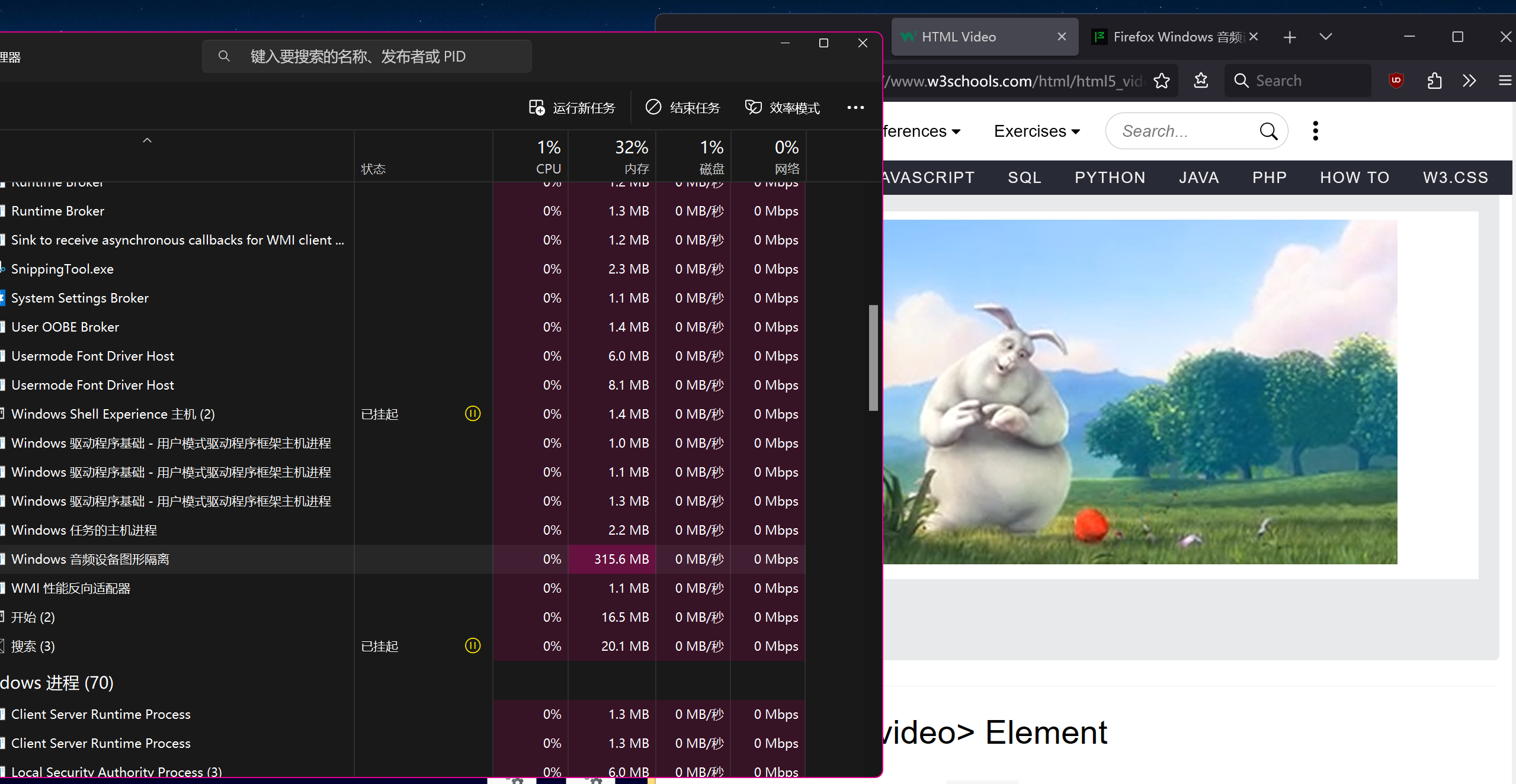
测试网站,截图为频繁多次使用快速/后退 https://www.w3schools.com/html/html5_video.asp
more options

Valgt løsning

已自行解决,使用microsoft提供的音频驱动,不要使用realtek音频驱动, 卸载设备,并尝试删除realtek驱动,

Ændret af EsoBlepsoGrapher den

more options

Hi EsoBlepsoGrapher,

Apologies for replying in English, but you're currently posting in our English forum.

Thank you so much for coming back to this thread to share your solution and marking it as the answer! By doing this, you're not only resolving your own issue but also helping others who might run into the same problem. We really appreciate it!

Stil et spørgsmål

Du skal logge ind på din konto for at svare på et indlæg. Start et nyt spørgsmål, hvis du ikke har en konto endnu.