


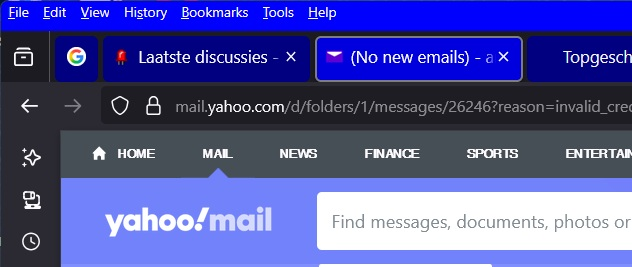
Menu bar items way too small

The items on the menubar are way smaller than all other text. How do I increase size of menubar only. (in UserChrome.css?) (it's barely readable now)
The items on the menubar are way smaller than all other text.
How do I increase size of menubar only. (in UserChrome.css?)
(it's barely readable now)
Alle svar (3)
Can you share a printscreen?
A user-friendly way is by using an extension.
like "Theme Font & Size Changer" https://addons.mozilla.org/el/firefox/addon/theme-font-size-changer/?utm_source=addons.mozilla.org&utm_medium=referral&utm_content=search
give you control over the font size of various parts of the browser's interface, toolbars and menus, without affecting web page content. You can install this from the Mozilla Add-ons store.