AI assisted tab grouping

I have carefully located all tabs in groupings suitable for me. Therefore, I do not want AI to make any changes. How can I ensure that Mozilla's AI does NOT make any changes to the groupings in which I have put my tabs.
Alle svar (2)
I believe Firefox should give users the ability to preemptively opt out of wasteful, useless features such as this. Generative AI is not much more than an investor obsession; investors who may as well be piggish creatures who toss money at things they don't understand that might get them more money.
cjfun1d said
I have carefully located all tabs in groupings suitable for me. Therefore, I do not want AI to make any changes. How can I ensure that Mozilla's AI does NOT make any changes to the groupings in which I have put my tabs.
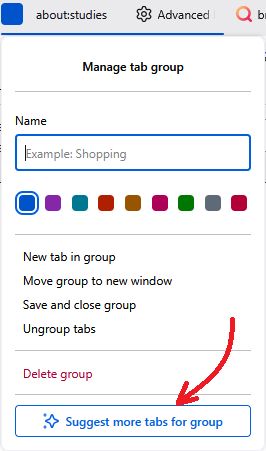
This is a user-initiated feature - your groups aren't changed without your active involvement. If this feature has been enabled in your Firefox, you will see this new command at the bottom of the context menu for a tab group:
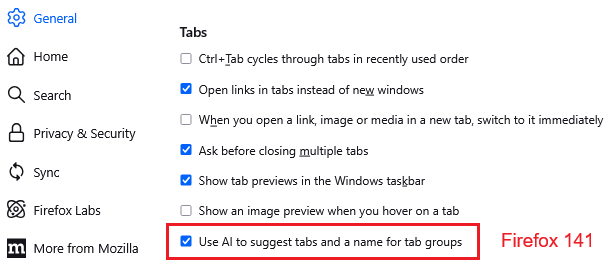
You can remove that button by going into Settings, General panel, Tabs section, and un-checking the box for "Use AI to suggest tabs and a name for tab groups":
More info: How to use AI-enhanced tab groups.