


email address book print option is missing?

The email address book print option is missing? All the address book options have disappeared.
I cannot find how to restore these options.
Valgt løsning
Thank you! Back to normal. So simple . Much appreciated. sigh
Læs dette svar i sammenhæng 👍 0Alle svar (6)
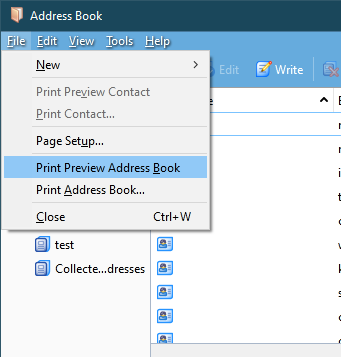
They are under the File menu in Address Book. Press Alt if the Menu Bar with File is hidden.
There is no File menu showing in the address book. The screen just has address book at top. Then lists contacts and their email. From a tiny icon on upper right I can choose to show more columns with phone, address etc, or I can choose to ‘write’ to individuals. That’s it. Everything else disappeared. I’ve used this forever and now I can’t access anything in the address book
Did you press Alt to show the Menu Bar (see picture)?
I have NO options to select from Address Book. Hopefully you will see from photo attached.
Open Address Book, press the Alt key. The Menu Bar should appear at the top of the window. Enable the toolbars under View/Toolbars.
Valgt løsning
Thank you! Back to normal. So simple . Much appreciated. sigh