My contacts in my Address Book are all messed up and about 1/3 of the emails are missing after a DELL reset. Please help!

After a DELL offsite tech attempted to resolve computer issues with a possible virus or malicious malware, he reset my computer. Once back up, I noticed that my Thunderbird email client, which I normally use and is connected to my Gmail account, was completely messed up with about 1/3 of the addresses missing as well as the last names and placement of contact info. Only the first name of my contacts are listed as that's the only field available. I don't find a LAST NAME field to even put one in.
All of my personalized Address Books are missing also. Only the Personal Address Book and Collected Address Books are there, but the columns of info are all wrong. There is no last name. When I click on the contact's first name, it shows The Display Name as their last name, the email address shows up under HOME, and their cell number shows up under WORK. I checked my Gmail online account and found that it too had missing addresses, but the names were there.
I went thru the RESTORE process to 29 days ago, but nothing changed. All this happened 3 weeks ago and I've been working with DELL techs over the phone ever since. Please help!!! I need this fixed immediately.
Alle svar (3)
As with all documents, did you back up your Thunderbird Profile on a regular basis or backed up your address books as LDIF or .csv files ?
What .mab files are in your profile name folder? In Thunderbird Help > 'Troubleshooting Information' click on 'Open Folder' this should open your 'profile name' folder in a new window and display a load of files and folders - if you cannot see them then you need to make hidden files and folders visible. http://kb.mozillazine.org/Show_hidden_files_and_folders
Sort by 'Type' column scroll down to the type section of 'MAB files' What is listed? also check to see if there are any .BAK files eg: abook.mab.bak Post an image so the forum can see what you see.
Hello Toad-Hall:
Thank you for your post. I've tried to follow your instructions but get to a certain point and am at a road block. You said to Sort by TYPE. I cannot find that option and therefore cannot find my MAB files. I found all the other folders but no MAB.
I need to get this fixed but have run out of ideas. 3 weeks ago my address book had listed FIRST NAME, LAST NAME, EMAIL ADDRESS and when I clicked on each email it would open another window with personal info, such as address, city, state, etc.
The way it is now, I have no LAST NAME and nowhere to find it to include it in the header. I have only the first names of each of my contacts. When I click on the Contact name, it opens their profile but information is out of sync. Their last name is in the Display column, their email is in the HOME column, their state is in Birthday; and under WORK is their address. I have to go back to my INBOX or TRASH to find people's email addresses.
I'm not a computer tech savvy person. Please give me simple instructions to fix this matter if it can be fixed.
re :You said to Sort by TYPE. I cannot find that option
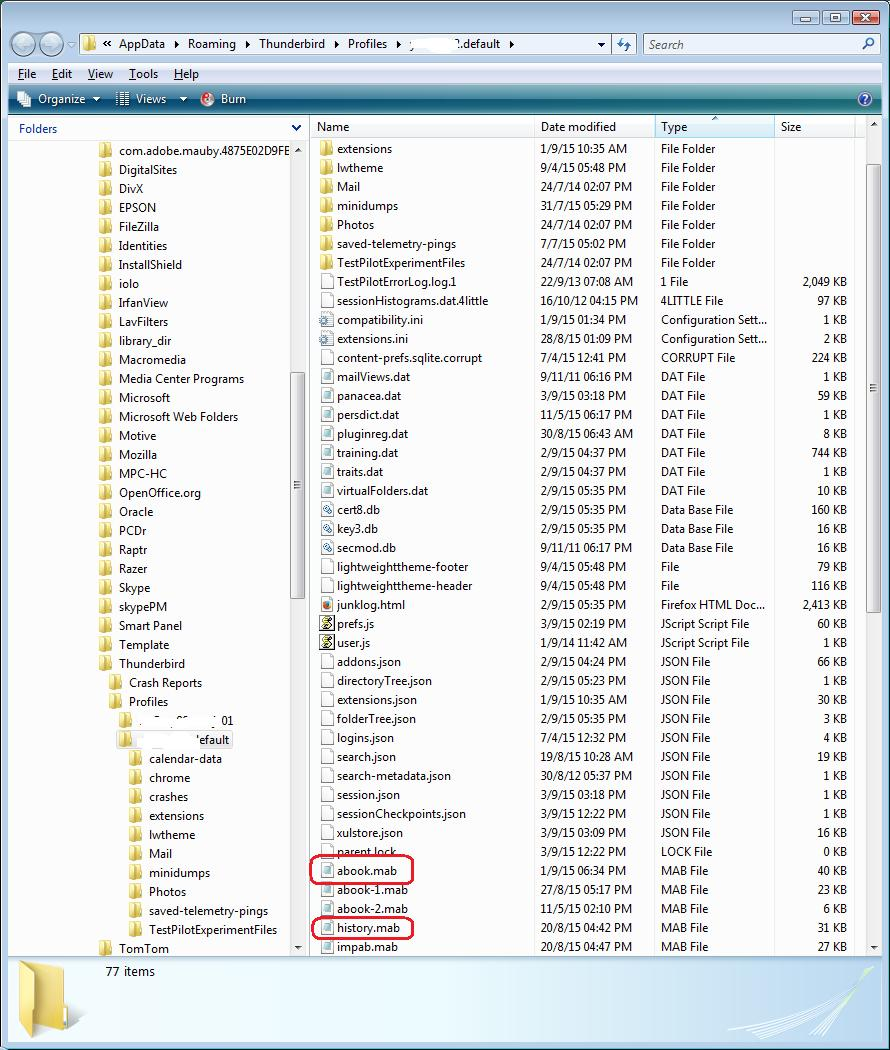
See image below as guide. If you followed instructions then you should be looking at something very similar to the image below. The column headers at the top say 'Name' , 'Date modified', 'Type', 'Size'. If you cannot see 'Type' then you have not selected it as a 'Column header'. Right click on where it says 'Name' or any other column header and you will get a drop down of available column headers. Select 'Type'. Like any column header, when you click on it, you are choosing to sort by whatever column header you click on.
address books : 'Personal Address Book' is called 'abook.mab' 'Collected Addresses' is called 'history.mab'. Other address books maybe called 'abook-1.mab'.
If unsure, Post image(s) showing all the files and folders.