


How do I save a PDF in Adobe so it displays correctly in the default Firefox reader?

I have seen discussions on how to change your own settings in Firefox so PDFs display correctly (Viewing PDF documents in Firefox 19+) however I am looking for a solution on how to save PDFs so they display correctly within the default new Firefox reader. Our PDFs are looking bad and I can't go into each clients browser settings and fix (http://www.cherrybekaertbenefits.com/wp-content/uploads/2014/07/ACA_Infographic_072114.pdf). Are their any settings within the Acrobat Distiller that will fix this without the viewer having to go into their own settings?
Valgt løsning
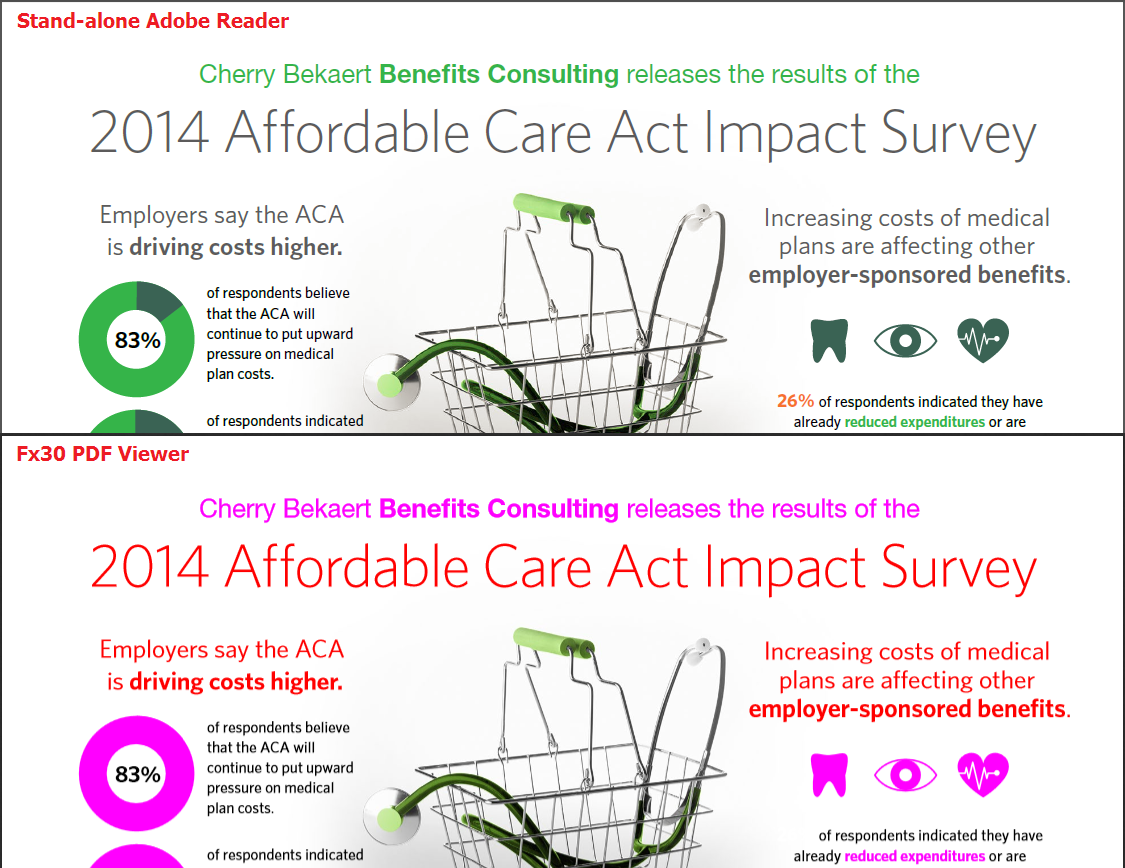
Hmm, not a subtle difference.
We haven't had many PDF experts or Adobe Illustrator users posting tips here; those might be sprinkled around on other forums, blogs, or support sites.
I did notice when viewing the PDF properties in Adobe Reader that the PDF was created with Optimize for Fast Web View enabled. This is a feature that allows for progressive rendering of PDFs over a slow connection (http://helpx.adobe.com/illustrator/kb/optimize-native-pdf-file-sizes.html#...). Could you try re-generating the PDF with that feature disabled to see whether it makes a difference?
Læs dette svar i sammenhæng 👍 0Alle svar (4)
Valgt løsning
Hmm, not a subtle difference.
We haven't had many PDF experts or Adobe Illustrator users posting tips here; those might be sprinkled around on other forums, blogs, or support sites.
I did notice when viewing the PDF properties in Adobe Reader that the PDF was created with Optimize for Fast Web View enabled. This is a feature that allows for progressive rendering of PDFs over a slow connection (http://helpx.adobe.com/illustrator/kb/optimize-native-pdf-file-sizes.html#...). Could you try re-generating the PDF with that feature disabled to see whether it makes a difference?
Visual comparison for quick reference. (Large file)
Ændret af jscher2000 - Support Volunteer den
That's it! Thank you!
'Optimize for Fast Web View' appears to be the bad setting.
Note: When you uncheck this option the PDF becomes significantly larger but no more bad color. I've found if you also uncheck 'Preserve Illustrator Capabilities' and 'Create Acrobat Layers from Top-Level Layers' as well then the file size goes back down quite a bit.
Thank you for the update. Maybe that needs to be added to the "to do" list for the viewer because in the days of slower bandwidth, that option was standard.