I have read the instructions to copy Thunderbird files to a CD, but can't follow the answers. Can some one lead me through a simple process?

I just need to copy some old email folders on to a CD. I tried to follow some of the directions on importing and exporting, but no joy. Please show me a step by step method. Windows 7, Thunderbird 10.0.2. Thanks
I just need to copy some old email folders on to a CD. I tried to follow some of the directions on importing and exporting, but no joy. Please show me a step by step method. Windows 7, Thunderbird 10.0.2. Thanks
All Replies (1)
Options available:
if Pop mail account.
You could backup the entire Profile:
- Install MozBackup tool
- info on Profile Backup, MozBackup links and download.
- http://kb.mozillazine.org/Profile_backup
- http://kb.mozillazine.org/MozBackup
- http://mozbackup.jasnapaka.com/download.php
If you only want to backup specific emails as individual .eml files:
- Right click on email and choose 'Save As'
- select the folder and click on 'Save'
If you want to have more options and easier to make a copy of several emails then use the ImportExporttool.
- Install this addon tool: https://freeshell.de//~kaosmos/mboximport-en.html
Use the link and scroll down to bottom to see download.
- Save the xpi file to your desktop
- In Thunderbird, 'Tools' > 'Add-ons'
- Add-ons Manager opens in new tab
- click on the daisy wheel icon and select 'Install addon from file'
- locate the saved .xpi file and click on 'open'
- close and restart Thunderbird
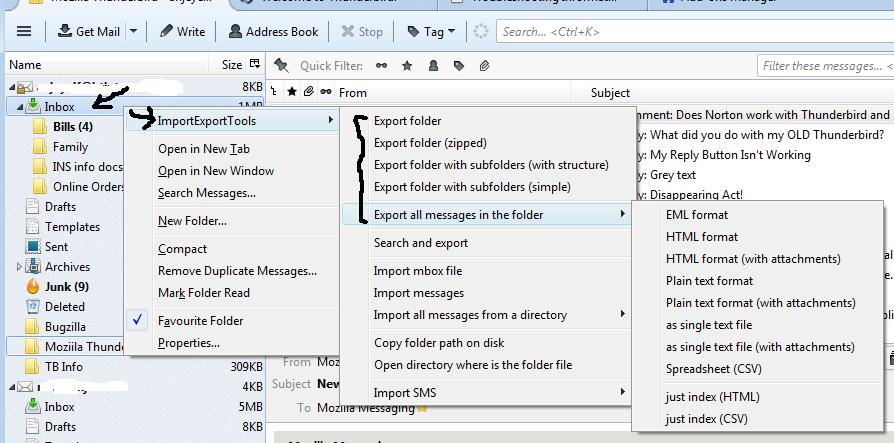
Now use the tool to Export the folder or emails in the folder.
- Right click on folder > ImportExport tool >
select from options available such as:
- you could 'export all messages in the folder' as 'eml' format
See image.