


Deletes and moves of e-mail messages from IMAP-inbox not synced to server

Dear readers,
For a while now, not all my actions in Thunderbird are synced on the online e-mail server.
When I move or delete an e-mail from the inbox, on another device (most of the time a phone or a tablet, using the native iOS e-mail software), this is visible in Thunderbird on my laptop with Windows 11.
In reverse, when use Thunderbird to delete a message from my inbox or move it to a local folder, it remains in the inbox on the other devices, and in the online e-mail interface of my provider.
Receiving, reading and sending of e-mails from Thunderbird all work properly. In Thunderbird I am subscribed to all IMAP folders.
I regularly update Thunderbird to the latest version (last time: this week)
Any suggestions what might cause this?
Kind regards, Ferdinand.
All Replies (10)
To make sense of this, I suggest screenprints of all devices server settings. You state that all are IMAP, and you also state that a message deleted from PC is still on the website. You also state that messages deleted from other devices still appear on PC. That could mean the PC is set for POP and leave on server. So, seeing all of the server settings are needed. thank you.
Thank you for you reaction, David. You seem to have overlooked that messages removed from other devices do disappear in Thunderbird as well. But I will check the settings and provide a screenshot tonight. (It’s early morning here.)
Modified by welkom50
Here is an overview of the settings for the account.
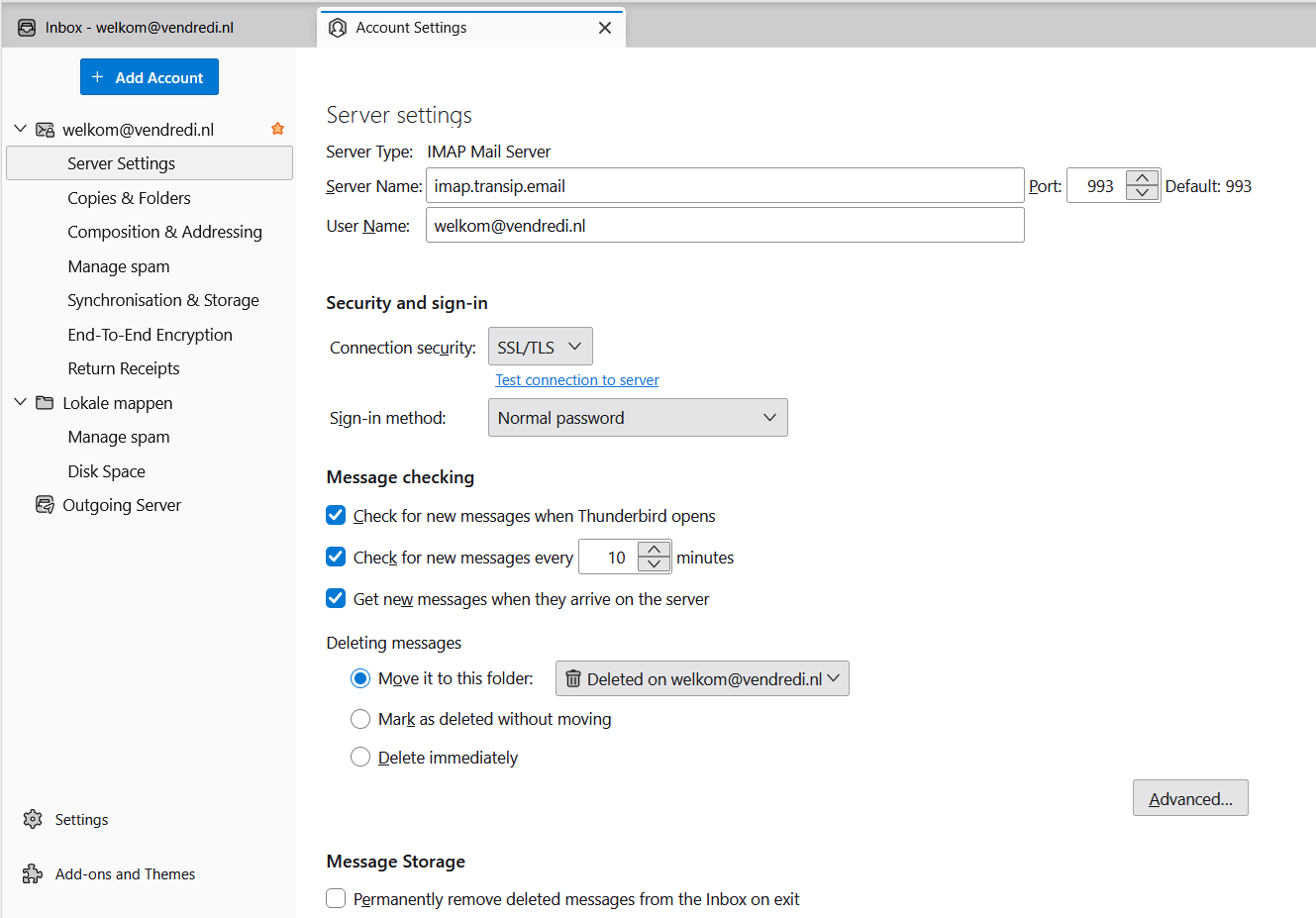
i am confused. In your original post, you state that messages deleted from other devices still show on the PC. And your later post says the opposite. I have no solution, I am just trying to get the facts. If you have an IMAP account and delete the message on PC and it still shows on the website, then it is not a true IMAP account and has nothing to do with Thunderbird.
Aha, David, now I understand. We have a misunderstanding. Let me rephrase my first statement.
When I move or delete an e-mail from the inbox, on another device (most of the time a phone or a tablet, using the native iOS e-mail software), this also happens in Thunderbird on my laptop with Windows 11.
Modified by welkom50
Well, I've never seen this. An IMAP account that deletes messages yet they stay online.. When you close and restart thunderbird, do the messages get downloaded again to Thunderbird? Knowing that may provide some ideas. The messages online will continue to be wrong, since they have supposedly been deleted. But if they're still online, it seems Thunderbird would download again. Please let me know that. I will also see if I can get another opinion on this. Please also check the synchronization&storage settings. Is it set to synchronize everything?
Well,
I apologise for the disturbance. Silly but true: the problem lies with the other clients (on iOS). When I look at my e-mail online, in a browser, I can see that deletes or moves that I execute in Thunderbird, are replicated online. (I don’t normally use that environment for reading or managing my e-mail.)
But not in my iOS e-mailclients! Any suggestions as to the cause of that are welcome, but I do not expect anyone to spend time on that, since this is not an Apple forum.
Kind regards, Ferdinand.
Modified by welkom50
re :When I look at my e-mail online, in a browser, I can see that deletes or moves that I execute in Thunderbird, are replicated online.
Good that means Thunderbird imap account is same as webmail account as viewed via a browser. That's expected because the imap folders synchronise with server folders, so should be a mirror image.
re: But not in my iOS e-mailclients!
Are your ios email clients using POP ? If yes, POP account folders do not synchronise with server. They access the server and simply download new mail from server Inbox to Pop account Inbox. They are completely independent of server.
That means the issue is not with Thunderbird as it is an imap account and it is updating and synchronsing with server.
My iOS clients are using IMAP as well:
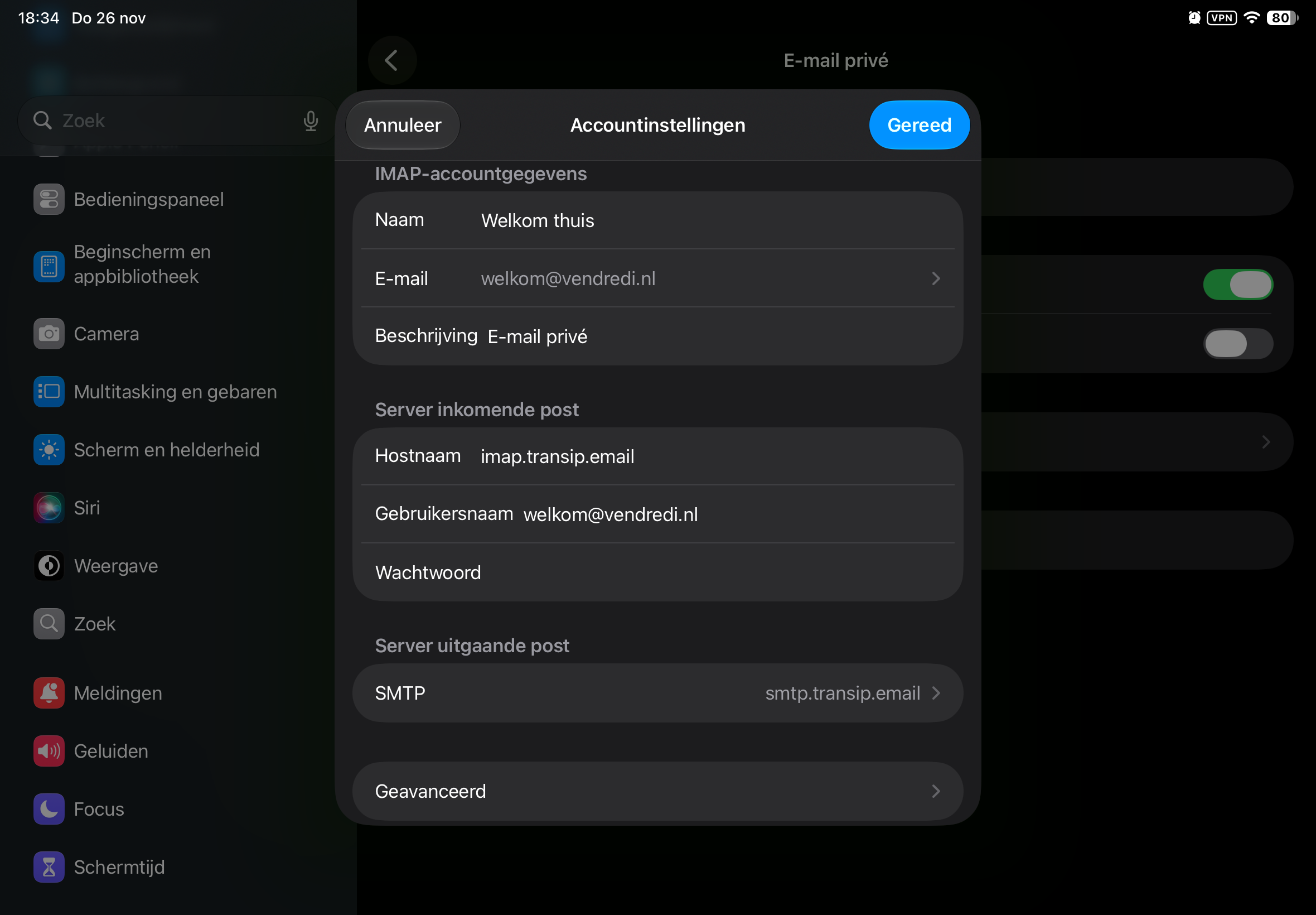

Modified by welkom50
You might get better Apple assistance at an Apple forum.