I've accidently deleted my personal profile (bookmarks, extensions, etc)
The Firefox icon on the taskbar on my PC suddenly appeared to have a 'rosette' stuck to it. I didn't understand what was happening? I decided it was not relevant to me and while I was attempting to get rid of it, I unintentionally deleted my personal profile in "Profiles"! This contained many important bookmarks and the important password manager extension. I am not very technical, but please can you show me how to recover my profile? Many thanks, Norman Clarke
All Replies (2)

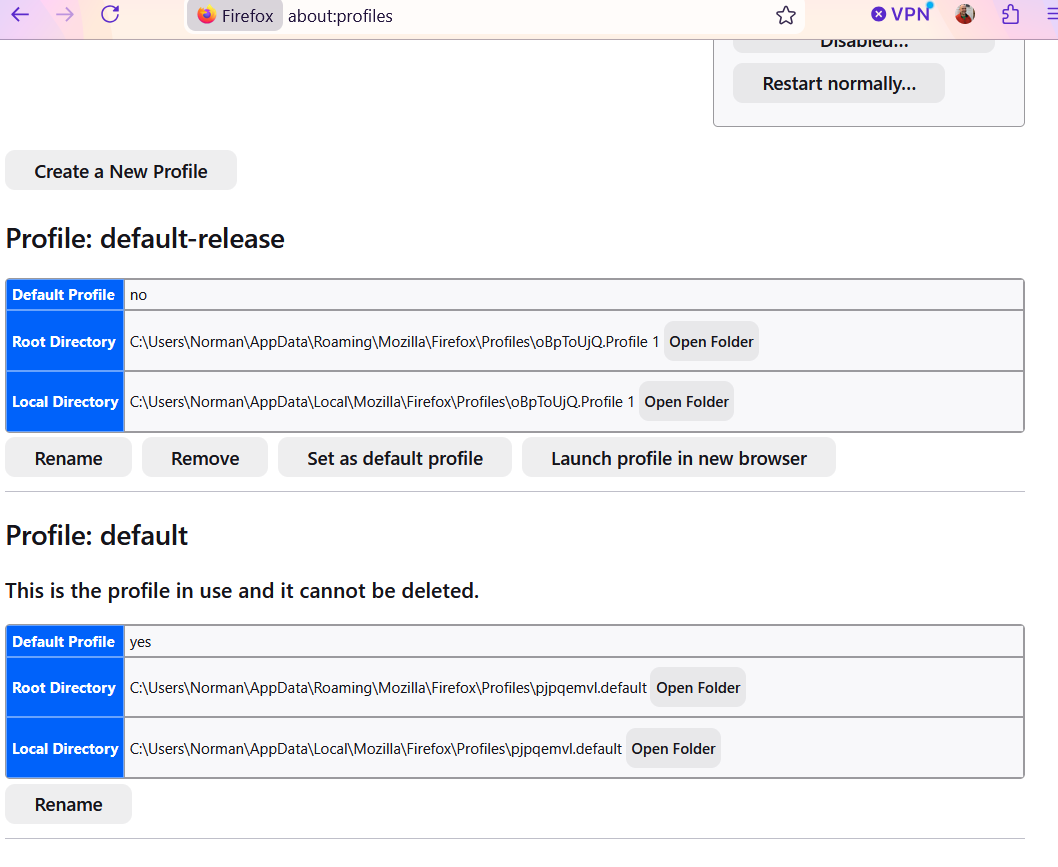
Type [about:prolfies] in the URL/address bar that show what profiles you may still have.
It also shows you the path where profiles are store and then you can access that Directory/Floder etc. to idf there are others, not disclosed.
By the way back up your profile folder, frequently, and to an off computer place, like an SD card :)
Hi Amoun – Thanks for responding so promptly… There appear to be two profiles (attached screen shot)… I clicked on the profile that gives the option to “Launch profile…” but it just produced a generic Firefox page?? Presumably I’ve lost all the Firefox settings I had before??
It’s quite possible I’m doing something wrong, please guide me if you can! Many thanks, Norman