


Cannot connect Gmail account to Thunderbird Mobile

I cannot connect my gmail account to Thunderbird for Android (although no problem whatsoever in Thunderbird for Computer). It always fails when Thunderbird tries to connect the SMTP outgoing server. Then it says after a while NETWORK ERROR failed to connect to smtp.gmail.com .... I am using the standard IMAP configurations. Please help.
All Replies (1)

Hi Ines
Are you trying to setup gmail in TBA for the first time, or was it working before and now stopped?
Are you using Outh authentication? Normally your directed to googles sign-in page to grant the app permission to access your account. Are you seeing the network error after completing the sign-in process?
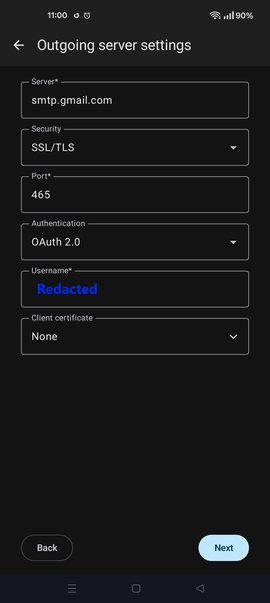
I've attached a screen shot of the SMTP settings from my working gmail. You can compare this with your settings found under settings > account > sending mail > outgoing server.
Do the Imap settings connect and authenticate successfully?
If your using any VPN, Antivirus or security apps on your phone, try disabling these. Do you have the same issue on wifi and cellular internet connection?
Modified by Platform34