


An error occurred while sending mail.

I have 2 parallel accounts with the same ISP. As of 2 days ago, whenever I try to send mail, I get this message: “Sending of the message failed. An error occurred while sending mail. The mail server responded: Command rejected. Please verify that your email address is correct in your account settings and try again.” I receive mail as normal. Using the other address with exactly the same settings allows me to send normally as I have for the past ten years! Nothing appears different anywhere in the settings. There were no upgrades that I am aware of. I have since found that I can send from my basic little "travel" computer without issue. Any ideas? BTW, using POP mail settings.
Modified by Matt
All Replies (10)
It may be that the second account is attempting to use the SMTP server of the first account. you can check that by - click 'account settings' - highlight the account that doesn't work in left sidebar - now, in lower right side of screen, click the button for 'edit outgoing server' and see if it is the same email address as the account. if not, revert to prior screen and select the dropdown menu of outgoing server and select the appropriate SMTP server.
Thank you for your suggestion. Although I've always used the same outgoing server address for both accounts, I tried different options as you suggested, but got the same response. :-(
Puzzling. Possibly, if you post screenshots of the SMTP server settings for the two accounts and incoming server settings for the two accounts, someone here may have suggestions.
The SMTP server settings for the two accounts and incoming server settings for the two accounts are they same as they were in 2011! There is no answer in the settings. There is no CHANGE in the settings.
I think the difference is that I am indicating there is a problem in the setup and you are convinced that nothing is wrong. If nothing is wrong, then we need do nothing. If something is wrong, then an investigation seems prudent. Since you state that nothing has changed, your solution should be to your email provider.
As I noted earlier, I have compared the settings between the two accounts. I have compared the settings to those on my other computer. The other computer works fine. I have sent from it without problems since this issue arose. Ergo, it is NOT the email provider, and it is NOT in the setup! I am now convinced that one of the files in this T-Bird program has somehow been corrupted. The issue is to find which file and replace it without compromising many years of saved info by losing my total profile for this account.
It is safe to install thunderbird on top of itself without uninstalling. That replaces all application files, but leaves the profile intact. check your version and download the same release. do this while thunderbird is not running.

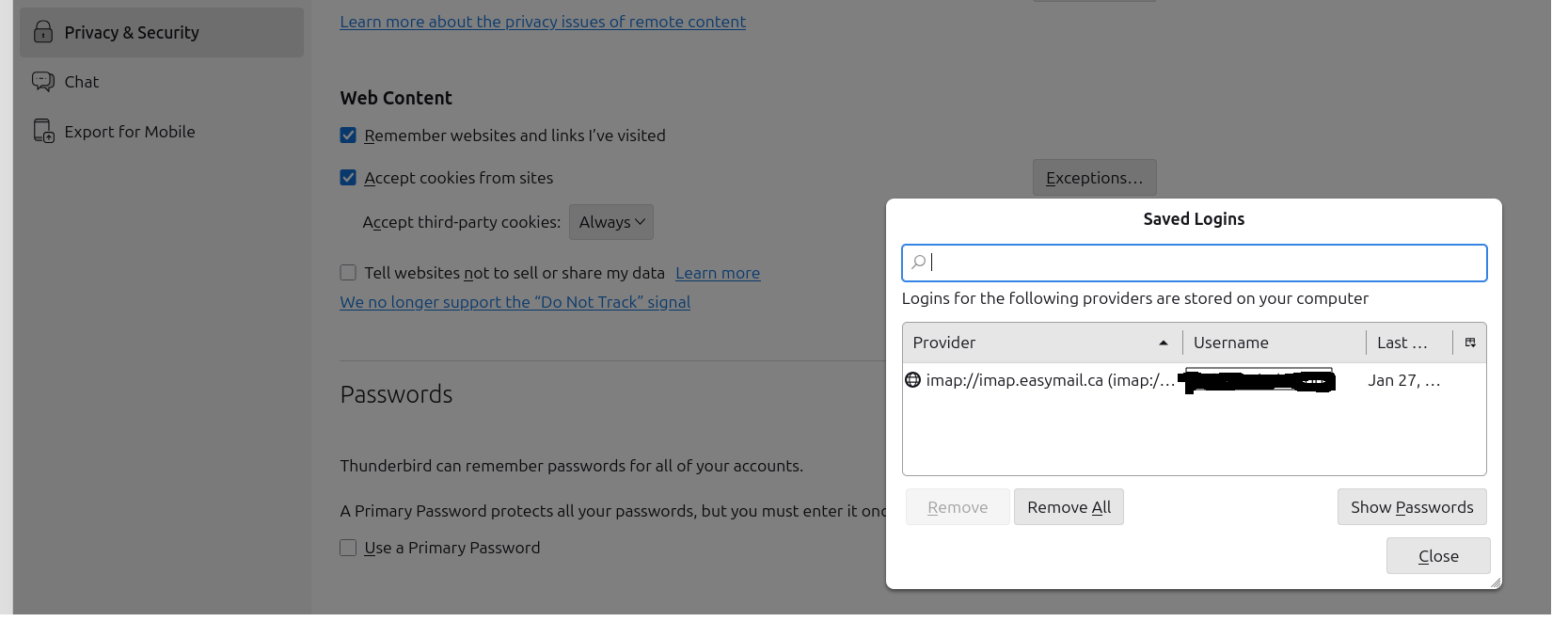
I have a very similar problem. I am thinking the issue is that I have a different URLs for Sending emails, and a different URL for Receiving emails. I use EasyDNS.com My Thunderbird incoming email URL is imap.easymail.ca My Thunderbird outgoing email URL is mailout.easymail.ca But when I look at the Privacy & Security -> Passwords -> Saved Logins settings there is only the incoming URLs.
I don't see a way to add the second, outgoing email server URL of mailout.easymail.ca
As a test I installed "Betterbird". The problem of not being able to send emails went away. Clearly a bug with Thunderbird.
Thank you for your suggestions. I tried installing Tbird on top of itself as David recommended, but to no avail! I also tried a different URL. Still no go. At this point, I am forced to used my ISP's webmail to send, or to send from my business-related account. It's a real "Pain I T A"! My next thought is to go to an expert shop and have them save my profile, then wipe and re-install the whole bloody mess!