


I have updated wrong password

Hello, unfortunately I have updated wrong password. I was visiting a site and it forced me to change password. So I let Mozilla auto-generate one and clicked update. The password however didn't match their requirements. So now I am stuck with Mozilla that has updated password in its and the site that requires the old one. Luckily I can see that there is file called "logins-backup.json" in my AppData directory. I have no idea how to access it and restore it though. I tried copying or renaming the file, but windows keep saying I don't have permissions to do that(even though I am owner of the file). Is there any way to restore the old password? Thank you.
All Replies (6)
Prihlasovacie údaje uložené vo Firefoxe sa dajú ešte dohľadať a to takto: - Firefox - Nástroje - Možnosti - Bezpečnosť - Uložené heslá - Zobraziť heslá http://imgbank.cz/images/2014/11/21/Firefox_hesla.jpg
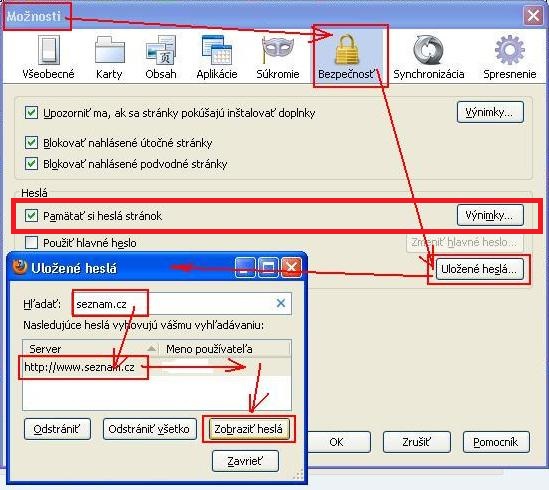
Tam se bohuzel drzi pouze posledni ulozene heslo. Alespon v te verzi, kterou mam ja.
Automatická obnova: Funguje, pokud Firefox zjistí, že databáze přihlášení chybí nebo je poškozená.
Zavři Mozilla Firefox, otevři složku profilu Firefoxu. Najdi a odstraň nebo přejmenuj soubor: logins.json, ale key4.db zachovej.
Nech v profilu logins-backup.json. Spusť Firefox.
Firefox při startu automaticky obnoví logins.json ze zálohy. Hesla se znovu objeví v about:logins.
Firefox jsem zavrel a pokusil se soubor prejmenovat. Bohuzel dostavam "Pristup byl odepren.". To same kdyz jsem zkusil spustit cmd jako spravce a pokusil se soubor prejmenovat z terminalu. Mam tu pouze jednoho uzivatele na ktereho jsem prihlaseny.
Přístup „odepřen“ není způsoben právy uživatele, ale tím, že profil Firefoxu je stále zamčený běžícím procesem (nebo službou na pozadí). Nejde o chybu oprávnění ani o to, že bys nebyl správce. Taky může zrovna běžet synchronizace. Měl by pomoci restart počítače.
Po startu Firefox nespouštět, ale rovnou otevřít složku profilu a přejmenovat soubor.
Modified by poljos
Josef Vávra napsal(a)
... Bohuzel dostavam "Pristup byl odepren.". ...Vykonajte kontrolu disku (scandisk). Kontrola opraví všetky nájdené chyby na disku.