


Two different Sidebar Versions on same Computer - 133.0.3 (64-Bit)
On my new Computer I installed Firefox.
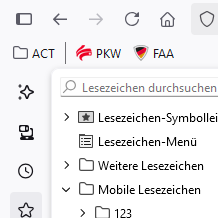
In one User Account the Sidebar has the new look (ref. Screenshot) whereas the other gets the old style, where you can either see or hide the bar completely.
Any advice to get the new version for both users - I cannot find the pertinent setting.
On my new Computer I installed Firefox.
In one User Account the Sidebar has the new look (ref. Screenshot) whereas the other gets the old style, where you can either see or hide the bar completely.
Any advice to get the new version for both users - I cannot find the pertinent setting.
All Replies (1)
Hi
The updated sidebar is only available to a small number of installations at the present time as we finish testing it and solving any remaining issues.
Hopefully it should be available to everyone very soon.