


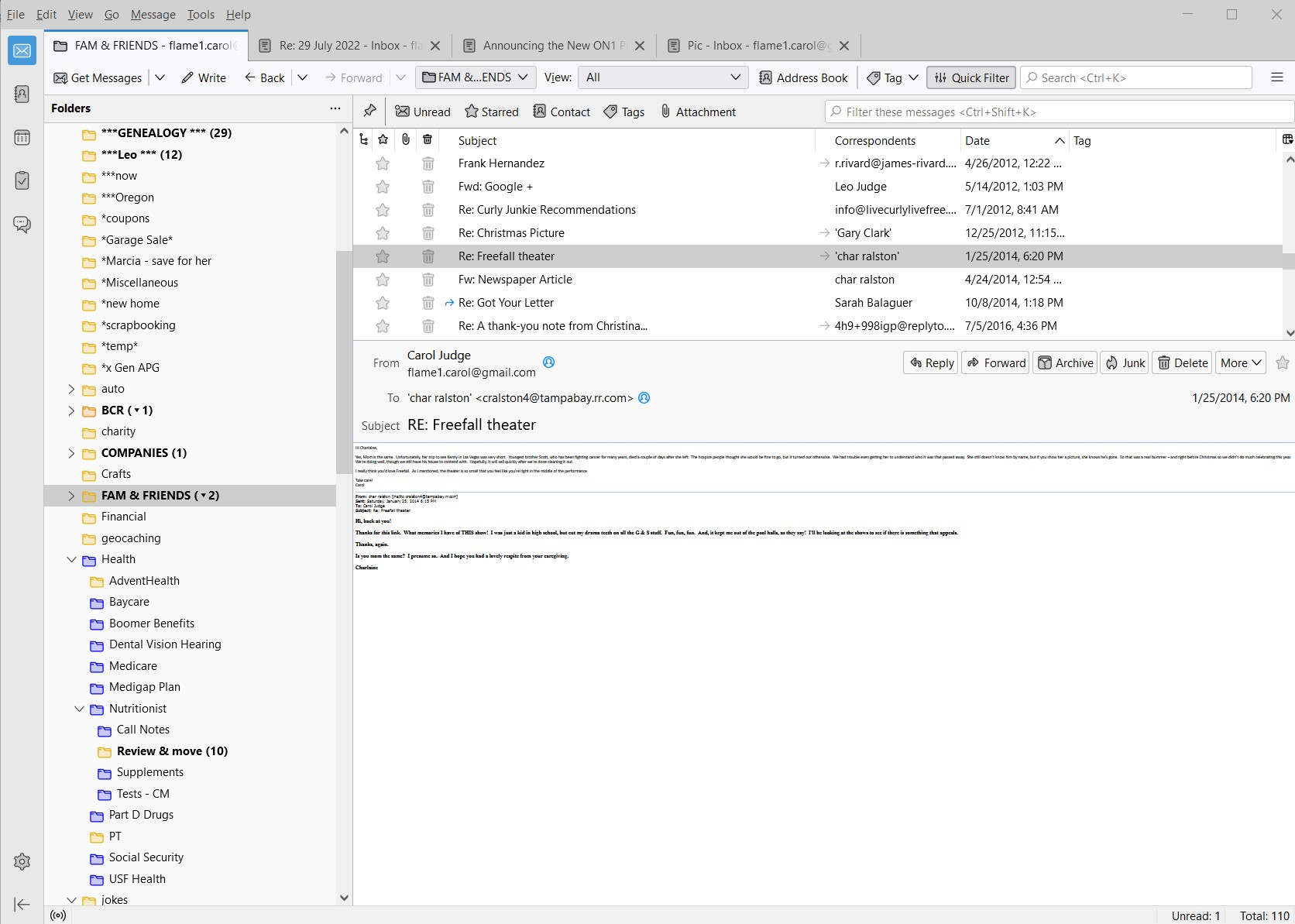
Email font displays so small it is unreadable

Ever since the last update to version 102.3.3 a few days ago, the font in every email is displaying so small that it is unreadable. The font on the folder names, the list of email titles, and when composing an email are all fine - it is only the text in existing emails that is displaying this way, and it is all emails - even those that are years old.
In Settings under General, it shows my default font as Calibri 17. The About section says Thunderbird is up to date. I'm using a Windows 10 PC. Not sure what else you need to know.
Chosen solution
Okay, well this is just bizarre. Apparently I hadn't closed Thunderbird since the update installed. I just closed and reopened the program and everything looks fine now. The email text is back to the correct size.
Thank you!
Read this answer in context 👍 1All Replies (3)
Try using View>Fontsize. This can increase the message's font as viewed.
Thank you for the suggestion, David. Unfortunately, it doesn't increase it enough. It enlarges everything on the screen including the folder names and the email subjects, so those get too large to deal with and the print in the message itself is still too small to read.
Any other thoughts? Everything was fine until I installed version 102.
Chosen Solution
Okay, well this is just bizarre. Apparently I hadn't closed Thunderbird since the update installed. I just closed and reopened the program and everything looks fine now. The email text is back to the correct size.
Thank you!