


Why does it keep saying it cannot save to my sent folder?

When typing an email with several pictures it automatically keeps saying it cannot be save to my draft folder when I have not asked it to save. They it keeps saying it cannot save to my sent folder when I send it. Them I get several of these emails in the saved folder which I did not ask it to do. This has just happened since the newest update and is very, very annoying!!!
Chosen solution
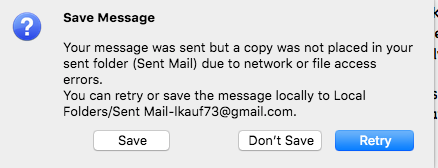
I am also having similar problem: Thunderbird is unable to save sent message to "Sent" folder in my Thunderbird when I take a message in my "Sent" folder and I try to "Replay". Thunderbird returns (same window posted above):
"Your message was sent but a copy was not placed in your sent folder (Sent) due to network or file access errors. You can retry or save the message locally to Local Folders/Sent-***my email address***."
Some particularities: -Problem persists even if I press "Repair Message" of the "Sent" folder.
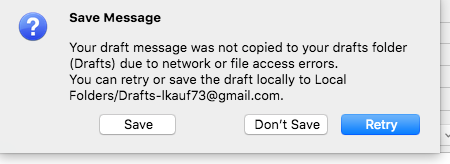
-If I try to save manually (Ctrl +S, or Cmd+S), similar error message, but with "Draft" folder: "Your draft message was not copied to your drafts folder (Drafts) due to network or file access errors. You can retry or save the draft locally to Local Folders/Drafts-***my email address***."
-If instead of "Replay" I use "Forward", messages are saved to "Sent" folder correctly, or to "Draft" folder if I save manually.
-When I take messages in any other folder (not "Sent" folder) and I press "Replay" or "Forward", Thunderbird is able to save a copy of my message in "Sent" folder.
-This problem happens only for messages that were sent to other people, not me.
-Problem appeared since company moved to a Gmail account (keeping the same email address, with no "gmail.com" extension).
-Problem persists even if I create another folder, for instance called "SentMail", and ask Thunderbird to copy sent messages to this new folder. EXACTLY same error message: "...sent folder (Sent) due to network or ..."
-I know all Sent messages are saved into "Gmail->Sent Mail", which in Gmail website is in "Sent" folder, but I want them also in my "Sent" folder of Thunderbird.
-I am using Thunderbird on Mac, version 68.8.0 (64-bit).
I notice following differences between folders in Gmail web and in Thunderbird:
-My folder in Thunderbird Gmail->Sent Mail is in web of Gmail, "Sent"
-My folder in Thunderbird "Sent" is in "[Imap]/Sent" of Gmail
Read this answer in context 👍 0All Replies (4)
In the Copies and Folders section of Tools/Account Settings, set drafts to be kept in Drafts on Local Folders, and also uncheck 'Place a copy in:' for sending messages as gmail automatically copies sent messages to the Sent folder.
That is not what I want to do. I want the sent mail to show up in the sent folder so I know it has been sent. Last night when these messages were showing up I had 5 draft mails from the mail ia was trying to send and finally 2 showed up in my sent mail folder, ANNOYING!!!! This has never happened before until after this last update.
Drafts and sent messages are different things. A draft is created, or autosaved, while a message is composed. If you get multiple drafts, store them on Local Folders. Sent messages will automatically be stored in the Sent folder, so to avoid duplicates uncheck 'Place a copy in'.
Chosen Solution
I am also having similar problem: Thunderbird is unable to save sent message to "Sent" folder in my Thunderbird when I take a message in my "Sent" folder and I try to "Replay". Thunderbird returns (same window posted above):
"Your message was sent but a copy was not placed in your sent folder (Sent) due to network or file access errors. You can retry or save the message locally to Local Folders/Sent-***my email address***."
Some particularities: -Problem persists even if I press "Repair Message" of the "Sent" folder.
-If I try to save manually (Ctrl +S, or Cmd+S), similar error message, but with "Draft" folder: "Your draft message was not copied to your drafts folder (Drafts) due to network or file access errors. You can retry or save the draft locally to Local Folders/Drafts-***my email address***."
-If instead of "Replay" I use "Forward", messages are saved to "Sent" folder correctly, or to "Draft" folder if I save manually.
-When I take messages in any other folder (not "Sent" folder) and I press "Replay" or "Forward", Thunderbird is able to save a copy of my message in "Sent" folder.
-This problem happens only for messages that were sent to other people, not me.
-Problem appeared since company moved to a Gmail account (keeping the same email address, with no "gmail.com" extension).
-Problem persists even if I create another folder, for instance called "SentMail", and ask Thunderbird to copy sent messages to this new folder. EXACTLY same error message: "...sent folder (Sent) due to network or ..."
-I know all Sent messages are saved into "Gmail->Sent Mail", which in Gmail website is in "Sent" folder, but I want them also in my "Sent" folder of Thunderbird.
-I am using Thunderbird on Mac, version 68.8.0 (64-bit).
I notice following differences between folders in Gmail web and in Thunderbird:
-My folder in Thunderbird Gmail->Sent Mail is in web of Gmail, "Sent"
-My folder in Thunderbird "Sent" is in "[Imap]/Sent" of Gmail