


Can not send emails from library

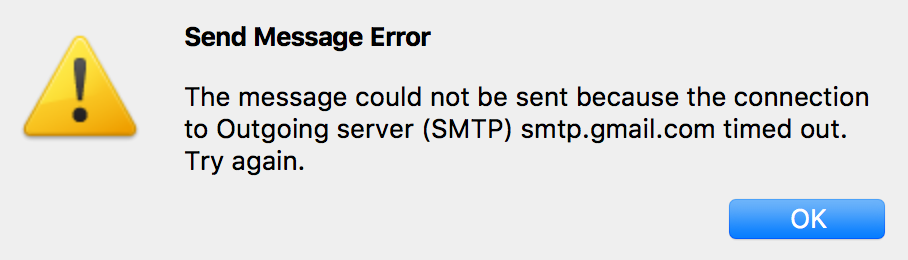
I can not send emails from the library using Thunderbird, however, it works fine at home and other places. I've tried changing the port number but no success I get the following error message (see attached image)
Troubleshoot information below:
Application Basics
   Name: Thunderbird
   Version: 52.9.1
   User Agent: Mozilla/5.0 (Macintosh; Intel Mac OS X 10.13; rv:52.0) Gecko/20100101 Thunderbird/52.9.1
   Profile Folder: Show in Finder
   Application Build ID: 20180709124824
   Enabled Plugins: about:plugins
   Build Configuration: about:buildconfig
   Memory Use: about:memory
   Profiles: about:profiles
 Mail and News Accounts
   account2:
     INCOMING: account2, , (none) Local Folders, plain, passwordCleartext
   account3:
     INCOMING: account3, , (imap) imap.googlemail.com:993, SSL, passwordCleartext
     OUTGOING: , smtp.googlemail.com:465, SSL, passwordCleartext, true
   account5:
     INCOMING: account5, , (imap) imap.gmail.com:993, SSL, OAuth2
     OUTGOING: , smtp.gmail.com:465, SSL, OAuth2, true
   account7:
     INCOMING: account7, , (imap) remedymarketing.com.au:993, SSL, passwordCleartext
     OUTGOING: , remedymarketing.com.au:465, SSL, passwordCleartext, true
   account8:
     INCOMING: account8, , (imap) remedymarketing.com.au:993, SSL, passwordCleartext
     OUTGOING: , remedymarketing.com.au:465, SSL, passwordCleartext, true
   account9:
     INCOMING: account9, , (imap) imap.gmail.com:993, SSL, OAuth2
     OUTGOING: , smtp.gmail.com:465, SSL, OAuth2, true
 Crash Reports
   https://crash-stats.mozilla.com/report/index/bp-3b82b503-8bb7-4bf4-8405-407ad0171127 (27/11/17)
   https://crash-stats.mozilla.com/report/index/bp-2083169b-46e5-4e55-8287-d29092170314 (15/3/17)
   https://crash-stats.mozilla.com/report/index/bp-4e7077aa-5069-4ba4-9e91-0d3362160530 (30/5/16)
   https://crash-stats.mozilla.com/report/index/bp-88ec74f9-694b-4f73-8833-ec3c32151124 (25/11/15)
 Extensions
   Lightning, 5.4.9.1, true, {e2fda1a4-762b-4020-b5ad-a41df1933103}
   Manually sort folders, 1.1.1, true, tbsortfolders@xulforum.org
Important Modified Preferences
Name: Value
     accessibility.typeaheadfind.flashBar: 0
     browser.cache.disk.capacity: 358400
     browser.cache.disk.filesystem_reported: 1
     browser.cache.disk.smart_size_cached_value: 358400
     browser.cache.disk.smart_size.first_run: false
     browser.cache.disk.smart_size.use_old_max: false
     extensions.lastAppVersion: 52.9.1
     font.internaluseonly.changed: false
     mail.openMessageBehavior.version: 1
     mail.spotlight.firstRunDone: true
     mailnews.database.global.datastore.id: a310d681-f68f-434e-acb5-5ed0b2de452
     mailnews.database.global.views.conversation.columns: {"threadCol":{"visible":true,"ordinal":"1"},"flaggedCol":{"visible":true,"ordinal":"3"},"attachmentCol":{"visible":false…
     media.gmp.storage.version.observed: 1
     network.cookie.prefsMigrated: true
     network.predictor.cleaned-up: true
     places.database.lastMaintenance: 1533894333
     places.history.expiration.transient_current_max_pages: 66667
     plugin.importedState: true
     security.sandbox.content.tempDirSuffix: {fdba7538-66c9-a643-9697-d72ff5747b13}
Graphics
     GPU #1
     Vendor ID: 0x8086
     Device ID: 0x0a2e
     Features
     WebGL Renderer: Intel Inc. -- Intel Iris OpenGL Engine -- 2.1 INTEL-10.36.19
     AzureCanvasBackend: skia
     AzureCanvasAccelerated: 0
     AzureFallbackCanvasBackend: none
     AzureContentBackend: skia
     TileHeight: 1024
     TileWidth: 1024
JavaScript
Incremental GC: 1
Accessibility
   Activated: 0
   Prevent Accessibility: 0
Library Versions
     Expected minimum version
     Version in use
     NSPR
     4.13.1
     4.13.1
     NSS
     3.28.6
     3.28.6
     NSS Util
     3.28.6
     3.28.6
     NSS SSL
     3.28.6
     3.28.6
     NSS S/MIME
     3.28.6
     3.28.6
All Replies (4)
Which account are you talking about? Account 3, 5 or 9?
I notice one of them (Account 3) uses smtp googlemail....do you have a @googlemail email address using that outgoing server? Is that server working ok?
Do you have an AV product scanning outgoing mail ?
Try a test: Boot up computer in 'Safe mode with networking' Start Thunderbird See if this allows you to send.
If yes, then perhaps you have an AV product scanning emails. Suggest you stop AV from scanning outgoing mail.
Many public places completely filter SMTP ougoing email ports. Your best luck would be connecting via VPN to your place.
Your account 3 is still using Normal password. I would change that to oauth2 like account 5 is setup. Do this for both the IMAP and the SMTP servers. I do not know if this is your issue in question but it will solve potential issues with your gmail accounts. Oauth2 is the gmail preferred authentication method.