

This thread was archived.
Please ask a new question if you need help.

Solved
Archived
After the latest update all of my bookmarked file folders have been removed How to put them back in bookmarks

After the latest update all of my bookmarked file folders have been removed How to put them back in bookmarks. Instead of just opening a file in bookmark I first need to go bookmarks, then to all bookmarks, then to bookmark menu, then select the folder. Why was the old system of bookmarks changed to something so complicated
After the latest update all of my bookmarked file folders have been removed How to put them back in bookmarks. Instead of just opening a file in bookmark I first need to go bookmarks, then to all bookmarks, then to bookmark menu, then select the folder. Why was the old system of bookmarks changed to something so complicated
All Replies (3)

Chosen Solution
Hi, To fix this, click on the hamburger menu, then press customize Firefox, drag the Bookmark Menu to your UI! Problem solved! If this helped mark as solution. Thank you.
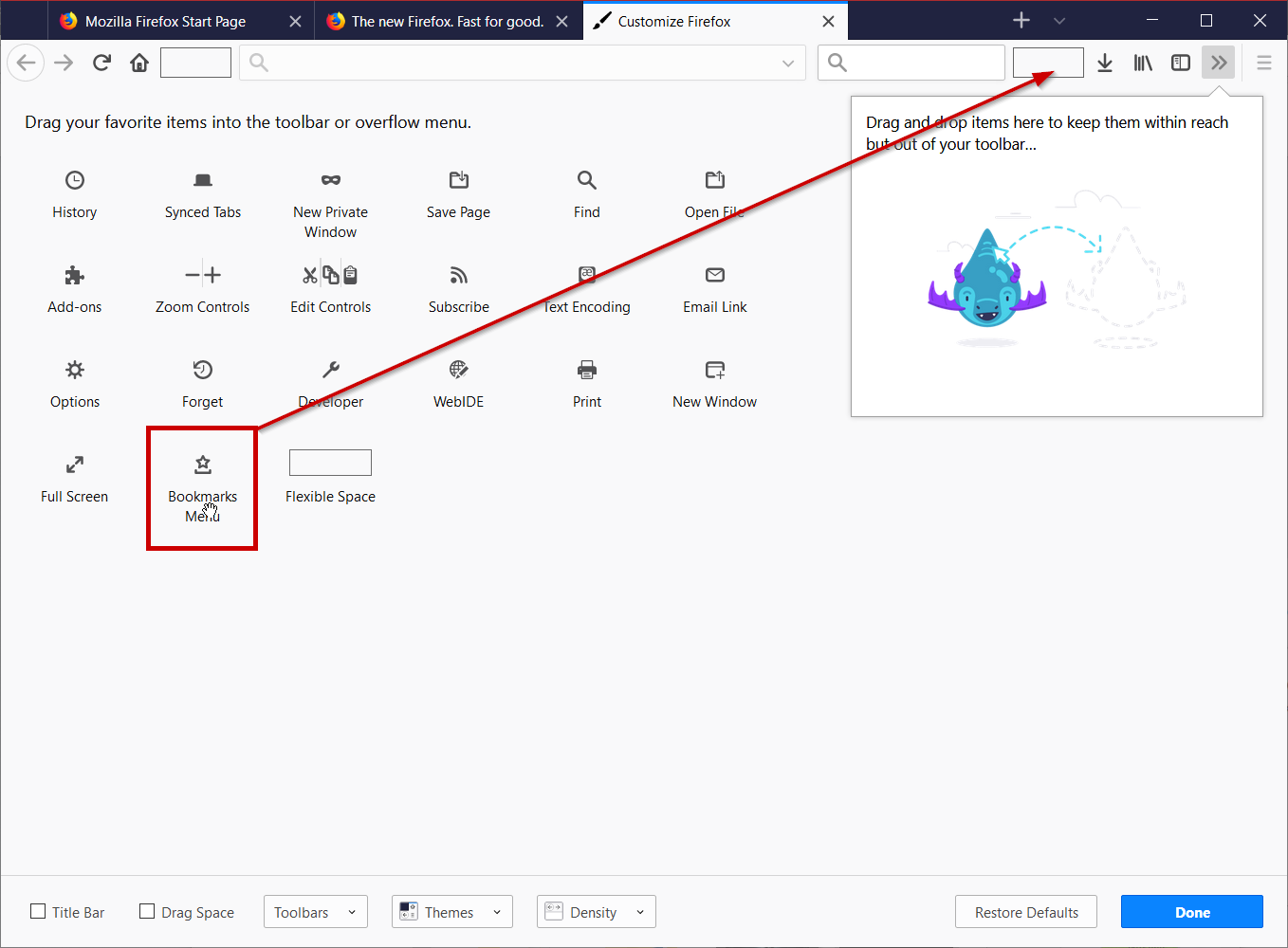
what is hamburger menu
The 3 line menu in the top right.