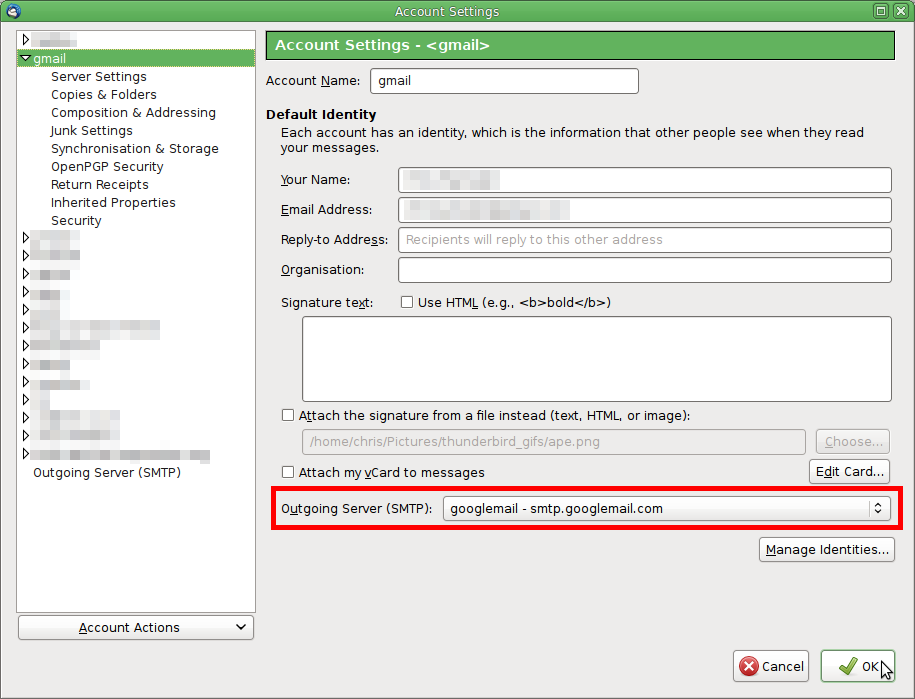
I send an e-mail from my work e-mail but once sent, the person receives it from my personal e-mail address. Help!

It's important that my outgoing work e-mails have the correct reply to address. When I send e-mails from my work e-mail address - it shows up as having been sent from an entirely different e-mail address to the person receiving it.
All Replies (8)
Are you using Gmail with either or both of these accounts?
Yes - I'm sending from .edu but it then switches to gmail.
Look at the .edu incoming account settings and check which SMTP server it is using. The symptoms suggest it is using your personal Gmail account smtp server.
I checked the account settings to make sure they matched the settings on my laptop. The account settings/server settings match exactly except this problem only occurs on my desktop. Server type, server name, and port match.
I even removed the g-mail account from Thunderbird and my work e-mails are still showing as sent from that g-mail account.
Can you post your Troubleshooting Information from the desktop computer please?
To find the Troubleshooting information:
- Open Help (or click on three-line-icon and select Help).
- Choose Troubleshooting Information.
- Clear the checkbox "include account names".
- Use the button Copy to clipboard to select all.
- Paste this into your reply to this forum.
If it complains that there is too much, you can remove all the material about fonts and printers.
Application Basics
   Name: Thunderbird
   Version: 52.3.0
   User Agent: Mozilla/5.0 (Windows NT 6.3; WOW64; rv:52.0) Gecko/20100101 Thunderbird/52.3.0
   Profile Folder: Open Folder
             (Local drive)
   Application Build ID: 20170815040357
   Enabled Plugins: about:plugins
   Build Configuration: about:buildconfig
   Memory Use: about:memory
   Profiles: about:profiles
 Mail and News Accounts
   account2:
     INCOMING: account2, , (none) Local Folders, plain, passwordCleartext
   account3:
     INCOMING: account3, , (imap) imap.googlemail.com:993, SSL, passwordCleartext
     OUTGOING: , smtp.googlemail.com:465, SSL, passwordCleartext, true
   account4:
     INCOMING: account4, , (imap) outlook.office365.com:993, SSL, passwordCleartext
     OUTGOING: , smtp.googlemail.com:465, SSL, passwordCleartext, true
   account13:
     INCOMING: account13, , (imap) imap.gmail.com:993, SSL, OAuth2
     OUTGOING: , smtp.gmail.com:465, SSL, OAuth2, true
Crash Reports
 Extensions
   ExQuilla for Microsoft Exchange, 52.3.1200, true, exquilla@mesquilla.com
   Lightning, 5.4.3, true, {e2fda1a4-762b-4020-b5ad-a41df1933103}
Important Modified Preferences
Name: Value
     accessibility.lastLoadDate: 1504809225
     accessibility.typeaheadfind.flashBar: 0
     browser.cache.disk.capacity: 358400
     browser.cache.disk.filesystem_reported: 1
     browser.cache.disk.smart_size_cached_value: 358400
     browser.cache.disk.smart_size.first_run: false
     browser.cache.disk.smart_size.use_old_max: false
     dom.apps.reset-permissions: true
     extensions.lastAppVersion: 52.3.0
     font.internaluseonly.changed: true
     font.name.monospace.el: Consolas
     font.name.monospace.tr: Consolas
     font.name.monospace.x-baltic: Consolas
     font.name.monospace.x-central-euro: Consolas
     font.name.monospace.x-cyrillic: Consolas
     font.name.monospace.x-unicode: Consolas
     font.name.monospace.x-western: Consolas
     font.name.sans-serif.el: Calibri
     font.name.sans-serif.tr: Calibri
     font.name.sans-serif.x-baltic: Calibri
     font.name.sans-serif.x-central-euro: Calibri
     font.name.sans-serif.x-cyrillic: Calibri
     font.name.sans-serif.x-unicode: Calibri
     font.name.sans-serif.x-western: Calibri
     font.name.serif.el: Cambria
     font.name.serif.tr: Cambria
     font.name.serif.x-baltic: Cambria
     font.name.serif.x-central-euro: Cambria
     font.name.serif.x-cyrillic: Cambria
     font.name.serif.x-unicode: Cambria
     font.name.serif.x-western: Cambria
     font.size.fixed.el: 14
     font.size.fixed.tr: 14
     font.size.fixed.x-baltic: 14
     font.size.fixed.x-central-euro: 14
     font.size.fixed.x-cyrillic: 14
     font.size.fixed.x-unicode: 14
     font.size.fixed.x-western: 14
     font.size.variable.el: 17
     font.size.variable.tr: 17
     font.size.variable.x-baltic: 17
     font.size.variable.x-central-euro: 17
     font.size.variable.x-cyrillic: 17
     font.size.variable.x-unicode: 17
     font.size.variable.x-western: 17
     gfx.direct3d.last_used_feature_level_idx: 0
     mail.openMessageBehavior.version: 1
     mail.winsearch.firstRunDone: true
     mailnews.database.global.datastore.id: 9b5212e9-4f2d-497f-a826-f34dac0ca41
     mailnews.database.global.views.conversation.columns: {"threadCol":{"visible":true,"ordinal":"1"},"flaggedCol":{"visible":true,"ordinal":"3"},"attachmentCol":{"visible":false…
     media.gmp.storage.version.observed: 1
     network.cookie.prefsMigrated: true
     network.predictor.cleaned-up: true
     places.database.lastMaintenance: 1506574098
     places.history.expiration.transient_current_max_pages: 122334
     plugin.importedState: true
     security.sandbox.content.tempDirSuffix: {a6ed7fab-3454-4839-8a52-561527702d4f}
Graphics
     GPU #1
     Description: AMD Radeon HD 7570
     Vendor ID: 0x1002
     Device ID: 0x675d
     RAM: 1024
     Drivers: aticfx64 aticfx64 aticfx64 aticfx32 aticfx32 aticfx32 atiumd64 atidxx64 atidxx64 atiumdag atidxx32 atidxx32 atiumdva atiumd6a atitmm64
     Driver Version: 13.152.0.0
     Driver Date: 8-30-2013
     Features
     Direct2D: false
     DirectWrite: true (6.3.9600.18696)
     WebGL Renderer: Google Inc. -- ANGLE (AMD Radeon HD 7570 Direct3D9Ex vs_3_0 ps_3_0) -- OpenGL ES 2.0 (ANGLE 2.1.0.2a250c8a0e15)
     AzureCanvasBackend: skia
     AzureCanvasAccelerated: 0
     AzureFallbackCanvasBackend: cairo
     AzureContentBackend: skia
JavaScript
Incremental GC: 1
Accessibility
   Activated: 0
   Prevent Accessibility: 0
Library Versions
     Expected minimum version
     Version in use
     NSPR
     4.13.1
     4.13.1
     NSS
     3.28.5
     3.28.5
     NSS Util
     3.28.5
     3.28.5
     NSS SSL
     3.28.5
     3.28.5
     NSS S/MIME
     3.28.5
     3.28.5
Do you know which account is the one using the wrong "from" address?
Account4 is an outlook.com account but it's using the googlemail smtp server to send messages. Messages sent from this account will appear as if sent from one of your gmail accounts, possibly your account3. But TBH I'm surprised it sends anything at all; I'd expect googlemail to refuse messages with an outlook.com from address.
Go to the outlook.com account settings and change the smtp server to one that mentions outlook.com
If it doesn't work after doing that then that's a separate problem, but we can work on that if needs be.