


I can no longer make the header bigger to allow personas to display well. Is this possible anymore?

I guess it's been awhile since I've updated Firefox. I used to have my "header" or top part of firefox be a little taller vertically. By doing this, personas show up really well. Currently, it seems that I cannot add space anymore or toolbars to the customize option. I would still like for the header of firefox to be taller, even if that space is still empty. Any ideas on how to accomplish this? I would really prefer to keep my Personas that I have, but at the moment, the personas are all cut off at the bottom. Can't even see Louise from Bob's Burgers(best character for sure), but I can still see the others. Firefox 50.1.0 on Windows Vista.
Chosen solution
I've never tried anything like that before myself. I did a quick search and didn't see anything that looked helpful. (You can try here: https://addons.mozilla.org/firefox/extensions/.)
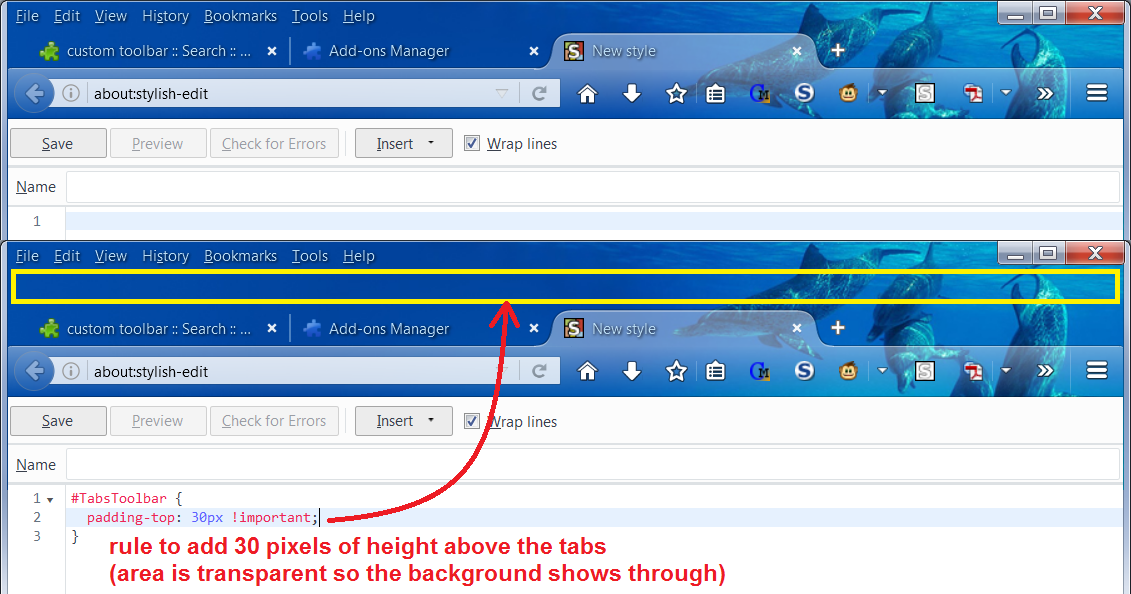
As an experiment, I created a custom style rule to add 30 pixels of height above the tabs within in the tab bar -- in style speak, this is "top padding", written as follows:
#TabsToolbar {
  padding-top: 30px !important;
}
The attached screenshot demonstrates the effect with a sample theme.
Note: 30px was just a first try, you can increase or decrease the value to suit your needs.
You can apply custom style rules to Firefox's interface using either the Stylish extension (shown in the example, makes it easy to preview and experiment) or a userChrome.css file, which avoids having to install another extension. If you are interested in trying out this approach, one of us could go into more detail.
Links for "self-help" reference:
Read this answer in context 👍 0All Replies (5)
There is no built-in way to add new toolbars to the top area, just the option to turn the Menu Bar and Bookmarks Toolbar on/off. There probably are a variety of add-ons which can cause the toolbar area to use more space, whether by adding their own toolbar, adding an extra row to the Bookmarks Toolbar, etc. Can you think of what would be actually useful to you, or do you have screen space to spare and you wouldn't mind something blank?
I already have the menu bar and bookmarks toolbars turned on. I already have all the add-ons that are useful to me. Could you suggest some that would take up some space by adding their toolbar? I wouldn't mind something blank. I have plenty of screen space, which is why I love the personas so much!
Chosen Solution
I've never tried anything like that before myself. I did a quick search and didn't see anything that looked helpful. (You can try here: https://addons.mozilla.org/firefox/extensions/.)
As an experiment, I created a custom style rule to add 30 pixels of height above the tabs within in the tab bar -- in style speak, this is "top padding", written as follows:
#TabsToolbar {
  padding-top: 30px !important;
}
The attached screenshot demonstrates the effect with a sample theme.
Note: 30px was just a first try, you can increase or decrease the value to suit your needs.
You can apply custom style rules to Firefox's interface using either the Stylish extension (shown in the example, makes it easy to preview and experiment) or a userChrome.css file, which avoids having to install another extension. If you are interested in trying out this approach, one of us could go into more detail.
Links for "self-help" reference:
Modified by jscher2000 - Support Volunteer
Oh, that is beautiful! 20px worked great for me between all the personas I have. Now, I can get back to letting them rotate between all the different ones I have. Wonderful!!
You can also consider to set a minimum hide of the Navigator toolbar area. That way you reserve space and there are no changes when you want to show or hide additonal toolbars like holding down Alt to show the menu bar or show/hide the Bookmarks Toolbar.
Add code to the userChrome.css file below the default @namespace line.
@namespace url("http://www.mozilla.org/keymaster/gatekeeper/there.is.only.xul"); /* only needed once */

#navigator-toolbox {min-height:200px!important; box-shadow:ThreeDShadow 0 -1px inset;}
The customization files userChrome.css (user interface) and userContent.css (websites) are located in the chrome folder in the Firefox profile folder.
You can use this button to go to the current Firefox profile folder:
- Help -> Troubleshooting Information -> Profile Directory:
Windows: Show Folder; Linux: Open Directory; Mac: Show in Finder - http://kb.mozillazine.org/Profile_folder_-_Firefox
- create the chrome folder (lowercase) in the <xxxxxxxx>.default profile folder if this folder doesn't exist
- use a plain text editor like Notepad to create a (new) userChrome.css file in the chrome folder (file name is case sensitive)
- paste the code in the userChrome.css file in the editor window
- make sure that the userChrome.css file starts with the default @namespace line
- make sure that you select "All files" and not "Text files" when you save the file via "Save file as" in the text editor as userChrome.css.
otherwise Windows may add a hidden .txt file extension and you end up with a not working userChrome.css.txt file