Why do bookmarks drug from address bar to desktop/saved show as a blank icon?

I took a look at these threads, https://support.mozilla.org/en-US/questions/1044913 and https://support.mozilla.org/en-US/questions/1039356 neither helped solve my problem.
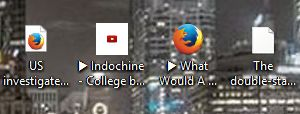
- 1 is how a bookmark drug to the desktop looked like. #2 is a favicon. #3 is what I get by (Control panel > Default programs > Associate a file type........ > find .URL and associate with FF) which also changes bookmarks that I have permanently on the desktop. I get the main Firefox icon, not like #1. #4 is what the icon looks like when drug to the desktop or saved in the Bookmarks folder(s).
If I manually create an internet shortcut on the desktop, it shows the correct icon, #1. I went in and found IconCache.db and renamed it to IconCache.db.old, then rebooted. No change.
TIA
I took a look at these threads, https://support.mozilla.org/en-US/questions/1044913 and https://support.mozilla.org/en-US/questions/1039356 neither helped solve my problem.
#1 is how a bookmark drug to the desktop looked like. #2 is a favicon. #3 is what I get by (Control panel > Default programs > Associate a file type........ > find .URL and associate with FF) which also changes bookmarks that I have permanently on the desktop. I get the main Firefox icon, not like #1. #4 is what the icon looks like when drug to the desktop or saved in the Bookmarks folder(s).
If I manually create an internet shortcut on the desktop, it shows the correct icon, #1. I went in and found IconCache.db and renamed it to IconCache.db.old, then rebooted. No change.
TIA