


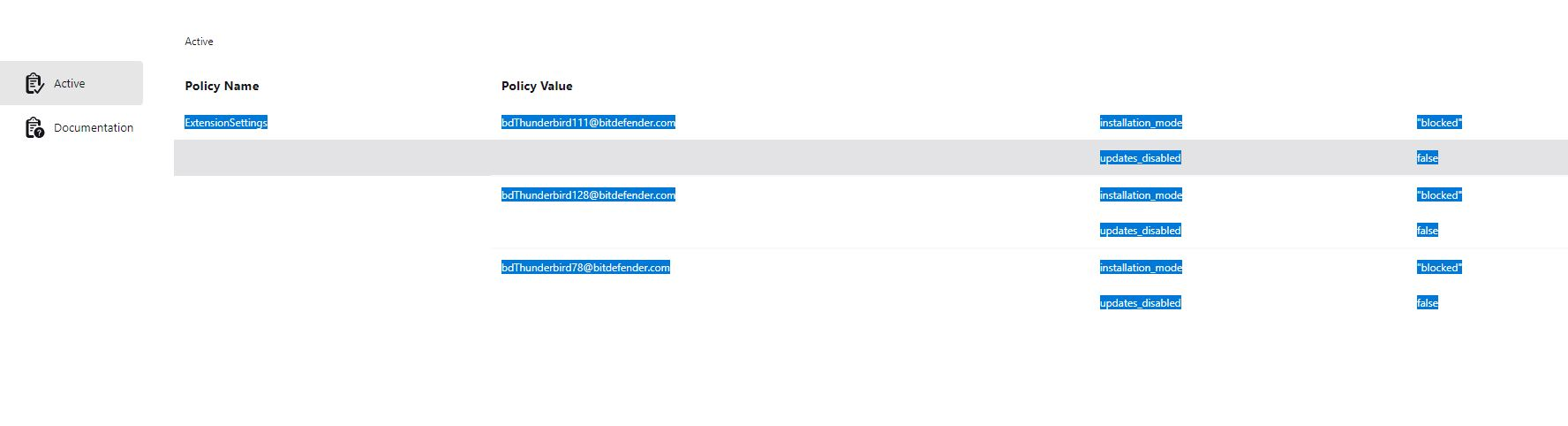
(Revisted) Thunderbird is being managed by your organisation CAUSE: Bitdefender

This is a continuation of the thread - [is being managed by your organisation CAUSE: Bitdefender]
The solution of deleting the Registry Key does not work. It simply comes back after reboot. I have engaged with BitDefender support and they suggested the same thing - they also added to uninstall TB which I am not going to do.
The issue is that the BitDefender extension is not installed in a normal way, and cannot be removed. The settings in BitDefender do not make any difference, I cannot change settings in a Thunderbird account eg change a folder location, it looks like it works, but it actually does not.
I did find in the about:config extensions.webextensions.uuids key has the bdThunderbird@bitdefender.com entry but there is no indication as to what other strings belong to the entry and I do not to mess things up.
I do realize this is a BitDefender issue, and i did follow up with their support but I am wondering if anyone has solved this annoying issue.
Thanks
All Replies (1)

The link to the other post is https://support.mozilla.org/bm/questions/1533447.
Honestly, if the reg hacks don't work any more and BD says dump TB, I'd dump BD in a New York minute. Windows Defender is all you need.