


How to remove the Open Link in Split View option in the dropdown menu?

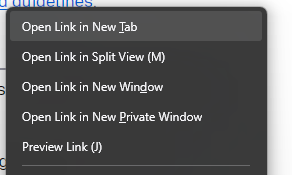
Hi. Now that the 'Open Link in Split View' has annoyingly replaced the spot previously held by 'Open Link in New Window' i keep clicking on it accidentally (muscle memory).
I don't want to have to retrain my muscle memory, but despite creating css file generated by Claude that should in theory remove the option, and putting it the Profile Folder, it will not go away.
How do i remove it?
Gekose oplossing
Hey Planetash,
That’s a totally reasonable concern. I’ve also heard similar feedback from others recently. You might find this thread helpful: /questions/1578736.
Lees dié antwoord in konteks 👍 1All Replies (4)
Gekose oplossing
Hey Planetash,
That’s a totally reasonable concern. I’ve also heard similar feedback from others recently. You might find this thread helpful: /questions/1578736.
Thanks, Kiki! I used rohe1318's solution and that worked perfectly, cheers! Here's the solution for anyone else who wants to remove it.
rohe1318 4/24/26, 6:19 PM
Had same issue today in FF 150.0, but it's simple to fix.
Open Firefox In address (URL) bar type: about:config Accept the warning, if you're willing to take the risk In search bar on next screen, type in: browser.tabs.splitView.enabled It will be shown as True Change that to False by clicking the 2-way arrows at right end of that line Done!
Additionally, you can look also at browser.tabs.splitview.hasUsed directly below the one above It's likely set to True - meaning you've used splt view You can change this one to False - meaning you've never used split view, but it really doesn't matter. You only have to change the first one to remove split view from the FF right-click menu.
Hello
If, browser.tabs.splitView.enabled value false, using Split View https://support.mozilla.org/en-US/kb/split-view-firefox, is not possible.