


If a Telecom uses real Email, i/.e. not WEBmail, and they use POP3...

Hello, and thanks for the read...
ISSUE: Every day I have to call the telecom ROGERS that took over for telecom SHAW, turn IMAP and Pop3 on 9 Email accounts (they lost 1). Sometimes the 1 to 2 hors chat w/ a human turned it back on will not last long.
DETAILS:
- I can receive outside Emails *because I can't send using Shaw/Rogers, checking for Email, just hangs at trying to login in to any of the 9/10 emails.
- When I can get a support person to check, they tell me that IMAP and POP3 are turned off.
- They will tell me they re-enabled it. But it doesn't enable for me.
- It all works OK when using the online webmail Zimbra. However, I need to check 3 of the 9 email accounts every hour, others every 6 hours, and others once a day at boot.
QUESTION: When using POP3, does the setting on my SMTP need a special setting on Thunderbird?.
NOTE: I am complying with "Rogers With Shaw" passing the buck to the Email Client (Thunderbird) by asking here - "Could It Be The Email Client'! And my answer is 'No', because Thunderbird works perfectly with 54 other Email accounts.
Thank for reading this, and for any input you may add, ~r
P.S., I'd like to see a upgrade to this input form that allows us to Preview out Post And, when I started this Post, it alerady had a image from a previous Post
All Replies (6)
No replies Close this post Opening new question under troubleshooting may fix this topic question. ~r
No replies Close this post Opening new question under troubleshooting may fix this topic question. ~r
Please mark this thread resolved to have it removed.
@david
Sorry for delay but as my OP says, I am having big issues with my new ISP when they took over my original ISP. The switch by Rogers (new ISP) left new customers in a trainwreck. Email and webmail (if you don't mind being profiled) was random availability.
Not only were there problems with Thunderbird, but the ISP that hijacked Shaw's customers have been trying to make webmail (Zimbra) work added more issues.
Their settings for POP3 (my preference) and IMAP for a couple of email accounts, I discovered, are wrong. They suggested weird port addresses. I tried internationally accepted ports and email worked. Sort of. There was still the issues with Thunderbird. Some email accounts in the far left column/pane/window only show the account name and Inbox, even though mail was sent, there is no Sent folder.
I have sorted out issues and making note as to which there are problems, them and or Thunderbird.
At least I have been able to talk to Rogers upper level support teams and promote Thunderbird over kiddie-mail.
Thanks for your patience David, ~r
Just hint... you have opened a number of related topics which appear to center around a general contusion about sending using a per account SMTP service which is configurable and this Shaw/Rogers thing which I only vaguely understand. Historically Shaw did not do much of a job with email, I reall some years ago customers inexplicably started being connected to Microsoft Hotmail servers instead of Shaws. I never did hear Shaw's reasoning for that one. So some of the issues might be trying to reconcile the oddities of Shaw's implementation with what the rest of the world does. It might also be some oddities in your system that are causing you more than the normal amount of grief.
But I think that this has drawn out long enough that actually logging the process is the only real way to figure out what Thunderbird is being told by the servers. Allowing for the fact that Rogers simply do not do email themselves, it is contracted to Yahoo. They now appear to have acquired mail infrastructure with Shaw and perhaps have little or no experience with it but I would think the issues would be more wide spread if it were the providers issue unless your account with them is messed up..
To this end I think very important that you share the settings Rogers have asked you to use and also the ones you are currently using, which I have little doubt are not correct..
To simplify the process, you can access the troubleshooting information on the help menu, using your mouse to drag and highlight the entire "Mail and News accounts" block and right click to copy it then paste the result into a reply on the forum.
Rogers post these setting for Shaw customers. https://www.rogers.com/support/internet/shaw-email/pop-and-imap-email-server-settings There is nothing odd or non standard about those settings but they do appear to differ considerably to those you posted on another topic on the forum.
I checked the server mentioned in the settings, and the IP address maps to Shaw, so here is no connection to the Rogers /Yahoo mail provisioning contract. https://ipinfo.io/64.59.136.142
Instead of relying on someone at the end of a phone to tell you something, Just check the status of the POP and IMAP stuff yourself. This link contains detail of how to do that in Shaws webmail https://www.reddit.com/r/shaw/comments/1kqomle/shaw_mail_anything_changed/ The topic is a year old, but I must assume the how to works. I don't use Shaw so can not verify it.
It might even be worth checking on it after they tell you they did it to be sure the update actually gets applied, but if it is resetting then the issue there is not Thunderbird.
Now seeing you use the username you do, I am guessing privacy is somehow important to you. It can also be the root of many connectivity issues. The use of a VPN, while popular can be a death knell for an email connection to a mail server, especially to send mail. Disabling cookies is also popular with the privacy concious, but they are required for oauth authentication to Google, Microsoft and Yahoo.
What antivirus and firewall do you use. The antivirus in particular can lead to no mail at all because they routinely rely on hacking techniques to scan mail resulting in Thunderbird not getting mail. This only applies to SSL, TLS, STARTTLS and other encrypted communications so accounts with connection security set to none don't have the same antivirus issues, but many providers insist on encrypted communications. It is not your choice as getting mail is like getting into a country. The server decides what is acceptable and the mail client has to offer the connection in the approved way. I suspect it may be relevant here from your discussion of the use of non standard settings that sort of work. Hence the need to know exactly what you are using.
I did find this that you p[osted in another topic. I struggled to read it due to it's sizing in the original context.
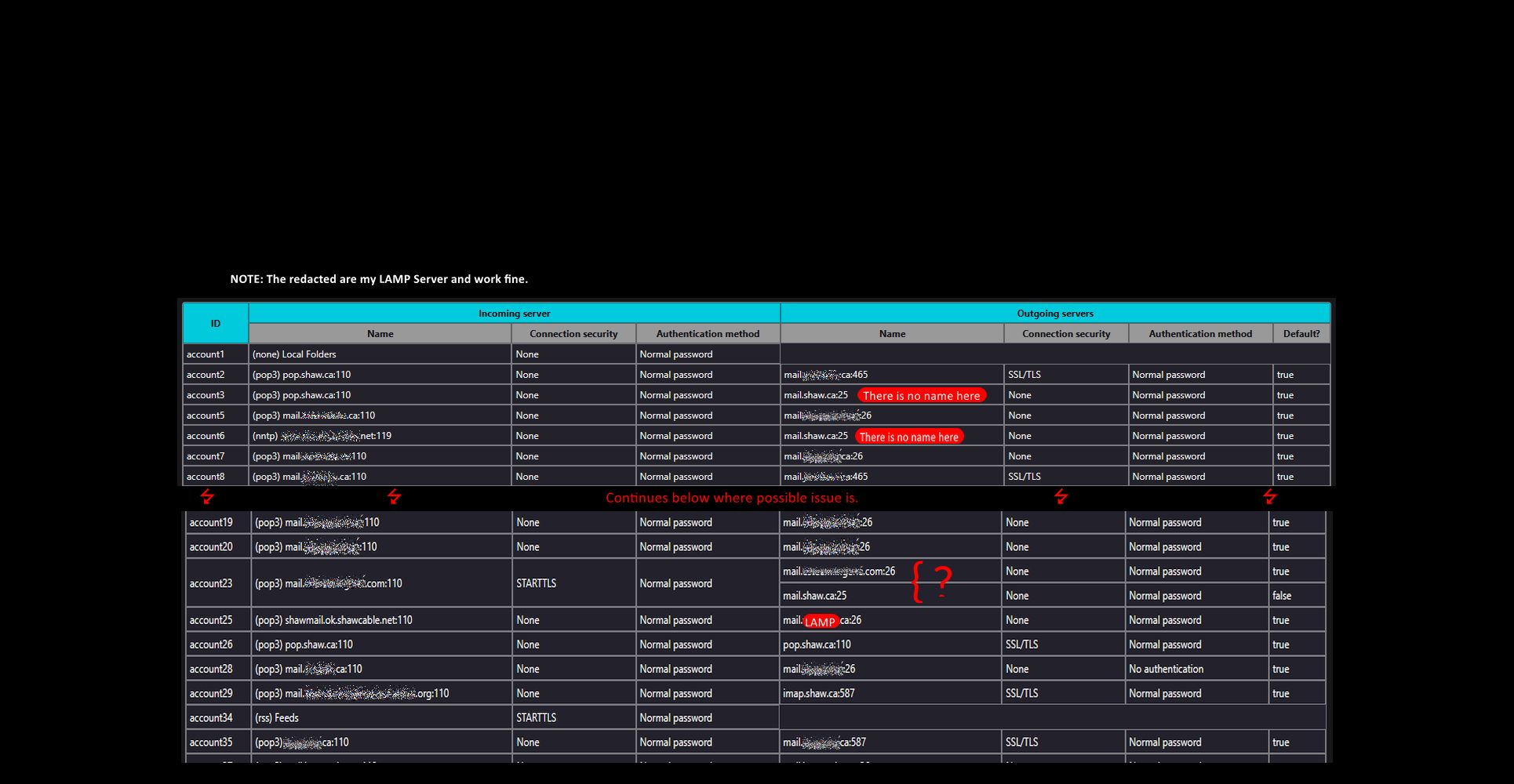
But I can make out the extensive use of port 110. That has not been a standard port for email for more than 20 years and while it might make your antivirus get out of the way it may not work reliably for any mail provider. The industry is committed to end to end encryption. That means SSL/TLS and that mains the use of encrypted ports. The default encrypted port is 995 for POP and 993 for IMAP.
I can also see what for this day and age is extensive use of Port 25 to submit email. This ceased to be a user facing default port around the same time port 110 was being phased out. It is now almost exclusively used for server to server mail transfer, not for users to submit mail for transmission. Port 587 and port 465 have taken over for SMTP mail submission from users and they are also encrypted with 465 being preferred for STARTTTLS and 587 being preferred for SSL and TLS.
SO my suggestion other than offering your current settings is to change to what the provider tells you to use and disable any antivirus other than windows defender. See how that goes.
david said
Please mark this thread resolved to have it removed.
I don't think it's right to label "resolved" if it is not resolved.
Since many things changed at the ISP, and this post elicited only one response, I have narrowed down the ,means to comply with Rogers and they are really Rogers, though it says Shaw. Shaw only manages business accounts as Shaw. My me@shaw.ca is really me@rogers_yahoo.com Shaw no longer handles email for non-business accounts. They left that up to Rogers who immediately shoved everyone into Zimbra, Rogers 3rd party that they are not responsible for.
Of note for other victims of Rogers, is that they still auto-change default pop3 settings and IMAP off. One must use WEBmail to get to Zimba to get to settings to get to mail to turn IMAP and/or POP3 back on. They're still trying to figure out why that happens.
I am fighting the giant so that I can keep Email, not have to give up my rights to privacy by switching to Yahoo. ~r