


Firefox using more and more memory

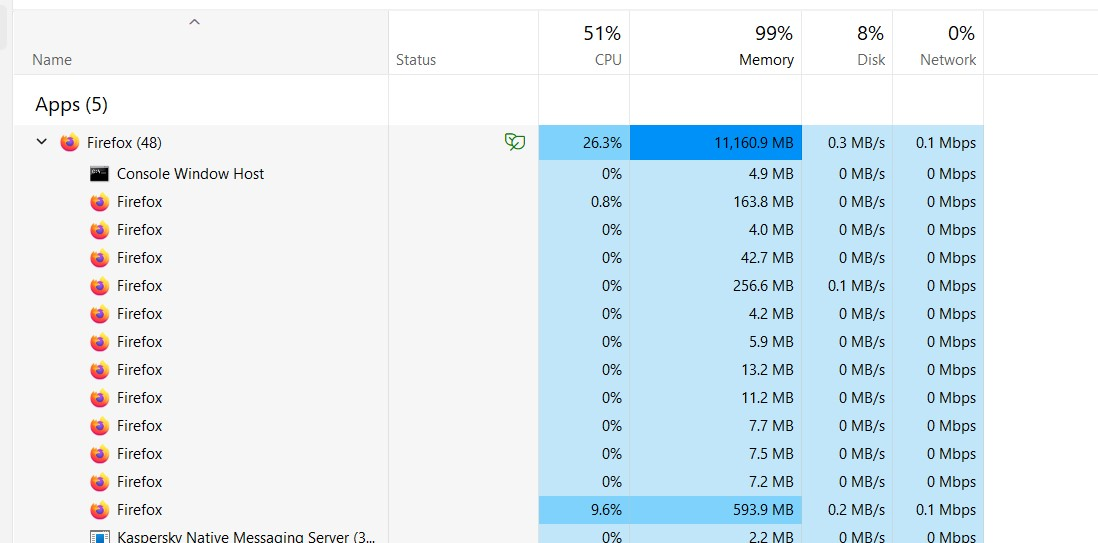
I am using Firefox 122.0.1, Windows 11 with all latest updates. Recently my HP Laptop has been slow to respond. I rebooted and opened task manager. I started Firefox and it was using about 1500 MB of memory. I closed some tabs to try to recover some memory. However, Firefox kept taking more, more and more. After 15 minutes, it was at 10,000 MB and climbing, and my system was using 99% of memory. I don't believe Firefox did this in the past and this is clearly not working properly. Any ideas?
All Replies (1)
Gekose oplossing
Start Firefox in Troubleshoot Mode to check if one of the extensions ("3-bar" menu button or Tools -> Add-ons -> Extensions) or if hardware acceleration or if userChrome.css/userContent.css is causing the problem.
- switch to the Default System theme: "3-bar" menu button or Tools -> Add-ons -> Themes
- do NOT click the "Refresh Firefox" button on the Troubleshoot Mode start window
- https://support.mozilla.org/en-US/kb/diagnose-firefox-issues-using-troubleshoot-mode
- https://support.mozilla.org/en-US/kb/troubleshoot-extensions-themes-to-fix-problems
You can create a new profile as a quick test to see if your current profile is causing the problem.
See "Creating a profile":
If the new profile works, you can transfer files from a previously used profile to the new profile, but be careful not to copy corrupted files to avoid carrying over problems.