Hierdie gesprek is in die argief.
Vra asseblief 'n nuwe vraag as jy hulp nodig het.

In die argief
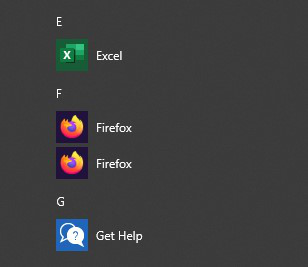
I have two Firefox icons in my Win10 start menu. How do I remove one of them?
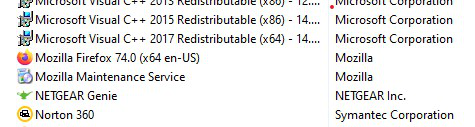
My Win10 start menu has two Firefox icons and both are version 74.0. When I click on the second icon, I receive a pop-up box that says Firefox is not my default browser. When I look at my list of programs to uninstall through the Control Panel, I only see one instance of Firefox in the list of programs. How can I delete the second icon? Thank you for any assistance you can provide.
My Win10 start menu has two Firefox icons and both are version 74.0. When I click on the second icon, I receive a pop-up box that says Firefox is not my default browser. When I look at my list of programs to uninstall through the Control Panel, I only see one instance of Firefox in the list of programs. How can I delete the second icon? Thank you for any assistance you can provide.
Gewysig op deur scortese70
All Replies (2)
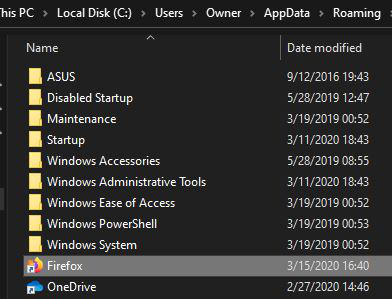
I have never had problem like that but It may help Right click on one of them > Open file location > Delete one shortcut then reboot and check.
Gewysig op deur Sky
Good evening. I did as you instructed but as you can see from the screen grab, there's only one Firefox shortcut present.