


how do i stop firefox blocking google.co.uk

Whenever I start Firefox I get a message saying that Google.co.uk has not given a safe certificate how do I stop this message?
All Replies (2)
hi, first please make sure that the date, time & timezone are set correctly on your system. if this doesn't solve the issue (or it is already set properly), a possible solution depends on different factors:
- what is the error code shown under technical details on the error page?
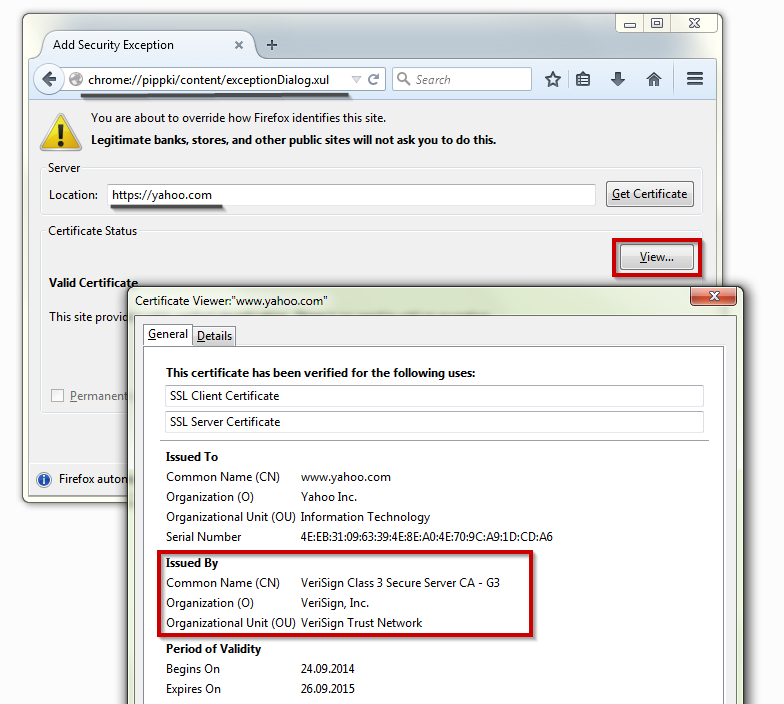
in case the error code equals sec_error_unknown_issuer, please attempt to inspect the failing certificate to see who is its issuer:
enter chrome://pippki/content/exceptionDialog.xul into the location bar, and in the page that opens, set the server location to "https://www.google.co.uk" in order to retrieve and view the certificate like in the attached screenshot.
- which issuer information does the certificate contain?
please report back with those two pieces of information. thank you!
Gekose oplossing
These instructions do not work!
No new page comes up after typing in the search instructions in the location bar.