


"Allow install of an extension" pop-up doesn't show up

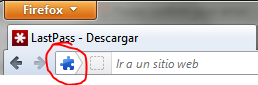
I've just installed Firefox 13 on my new laptop, and I'm trying to install lastpass from their website so I choose Windows and I click on the "Download" button beneath firefox, and I don't get the usual pop-up asking me whether I allow the install of that extension or not... I get the blue jigsaw icon on the awesome bar but I'm not being prompted to allow it, so I can't install it...
Isisombululo esikhethiwe
What happens if you click that puzzle icon on the location bar?
Try to disable hardware acceleration.
- Tools > Options > Advanced > General > Browsing: "Use hardware acceleration when available"
All Replies (3)
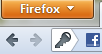
I tried logging into facebook just to see if the pop-up prompted for the password... but I get the same behaviour, the icon shows up, but I don't get prompted with the pop-up to remember the password...
Isisombululo Esikhethiwe
What happens if you click that puzzle icon on the location bar?
Try to disable hardware acceleration.
- Tools > Options > Advanced > General > Browsing: "Use hardware acceleration when available"
Thanks for your quick response, that was extremely useful, I tried a lot of pages but I didn't see that one, therefore I asked here, thank you very much once again, that solved my problem :)
BTW: Nothing happens when I click the icons that appear on the awesome bar