


How can I disable Global Privacy Control (GPC) in my browser?

When I tried to watch a video, I got the following message:
"Video unavailable due to your privacy settings
Your browser has Global Privacy Control (GPC) enabled, which prevents video providers from receiving viewing data.
To watch this video you will need to disable GPC in your browser and reload the page."
How can I watch the video?
All Replies (5)
- Click the menu button
 and select Settings.
- Select Privacy and security on the left.
- Go down to the Additional protections section.
- Click the box next to Tell websites not to sell or share my data to remove the check mark.
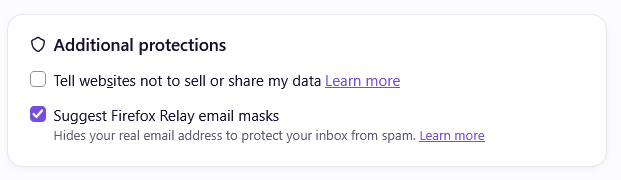
I followed your suggestion, but it did not solve the problem. Even after unchecking "tell websites not to sell or share my data," I still got the same message about the need to disable GPC.
Hi
Please can you share a link to the website where this is happening?
Paul, Here is a link to the website where this is happening (and thank you for your interest in solving the problem): https://www.nature.com/articles/d41586-026-03173-1 .
After switching VPN to the United States and turning that option off, this video became available immediately. You need to clear cache of that website with command + shift + R or switch VPN to Europe.