


Tabs do not restore, although that option is checked. History shows old tabs, not tabs at time of Firefox exit.

MacOS 26.6, Latest Firefox. 153.0.3. Tabs are not restoring, since update to latest FF. Tab History shows old stale tabs, not the tabs that were present at time of exiting Firefox. I had closed those tabs. Is this an artifact of caching?
The active tabs should be stored at FF shutdown, not the old closed tabs prior to that. This Firefox quirk is both on my Mac Mini M4, and on my MacBook Pro M3. Kind of a pain in the neck to restore where I was. It's enough to make me reconsider this browser - which I have used for decades, using Windows, Linux and now MacOS.
I researched how to restore a session. It told me to go to History and click Restore Session. There is no line with that name, in my Firefox, on a Mac.
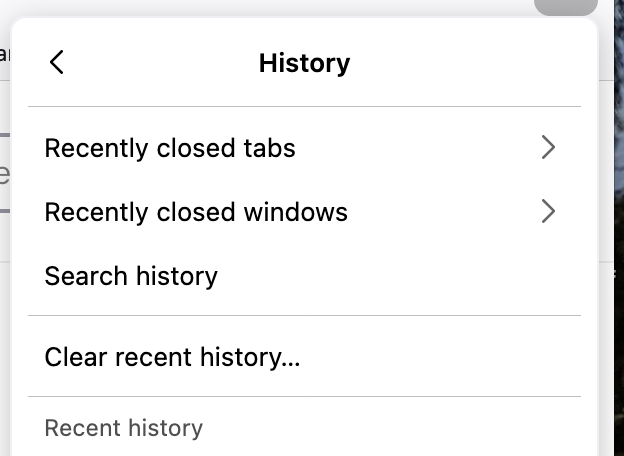
Under History the docs show 4 items before "Clear recent history...", I only have 1. Recently closed tabs 2. Recently closed windows 3. Search history. There is no Restore session.
The tabs that were open last session are in the start up window, and the check box is set to restore tabs and windows. But my tabs were not restored. (I only had a single window open.)
What can be done to "restore" previous behavior of Restore Tabs and Windows? Thanks for any and all assistance.
All Replies (8)
I did an update to MacOS 26.6.1. I closed FF. Upon closing, FF seemed to have created another window, but closed the original window. I only had one window open originally, I use tabs not windows. Had to reboot MacOS due to the update. Firefox came up, but the window showing was empty. However, there was a second window, which did have my tabs in it. I never created the empty window.
FF should not be creating new windows upon closing! Think I have seen this before in FF. (Much earlier versions.) Maybe this is a regression?
I will try closing FF again to see if the window and it's tabs are restored. BRB.
Hmm, at least this time, there was no extra windows created. And the tabs were restored for this window. I don't know if this is solved or not. Temporarily it seems ok. I do not know why extra windows are getting created, I'm not deliberately creating them. Is it possible for websites to do this? Can this be prevented by a setting?
For session restore history/backups, see e.g. this rather unrelated thread that however shows some file locations and descriptions how to put an old session store file into the current state.
Is Firefox you default browser? Could something during the update process try to open a web page that would end up as the new window that ends up obscuring your primary window, and would also get restored later? Or that happens even during normal manual restarts, with no extra window, that you're unable to restore your last session?
@jbr I will read that thread, thank you for the link. I will take a look at it.
FF is not my default browser on my Mac. So it may be unlikely that OS updates make that change. Have no idea really why this extra window gets created, but it does, via some process. This has happened before to me, on Linux, years ago, so I'm leaning towards a website, but at the moment I have no proof.
I know of one website that has weird coding, that opens a new window rather than a tab when you view a picture. Wish I could prevent that... Been burned by that in the past. Whenever I visited there, I had to make a conscious effort to close that weird window. But lately, (past year) I have not opened any photos there.
Scripted windows that require certain dimensions can still do it (as per API specs), you can however override these as well with internal prefs: support.mozilla.org/en-US/questions/1592767#answer-1832008 (YMMV, it's not a supported code path)
@jbr This is what I have in my about:config
browser.link.open_newwindow 3 browser.link.open_newwindow.disabled_in_fullscreen true browser.link.open_newwindow.override.external -1 browser.link.open_newwindow.restriction 2
So just change the bottom line from 2 to 0? Are the other settings reasonable?
Thanks for your help so far!
Yes, that is correct.
You can try it here https://www.w3schools.com/jsref/tryit.asp?filename=tryjsref_win_open3 (there's a "Try it" button in one of the panels) to see before — after. (=floating window vs. a normal full tab)
Don't forget these will start putting all similar popups into tabs, things like PayPal logins, site surveys etc., so don't be surprised later;]
The other values are defaults and you don't need to look into them too much unless you think they might be related to the functionality that opens new windows from somewhere (each will have some scenario it controls if you search for each of these prefs and read any posts that mention these).
Thanks. I tried that and it works as expected. Hopefully this will help solve the original problem. I saved the default config, so I can revert if necessary. Not ready to say solved, but getting close!