


Cloudlare Validation error on Attempted Login

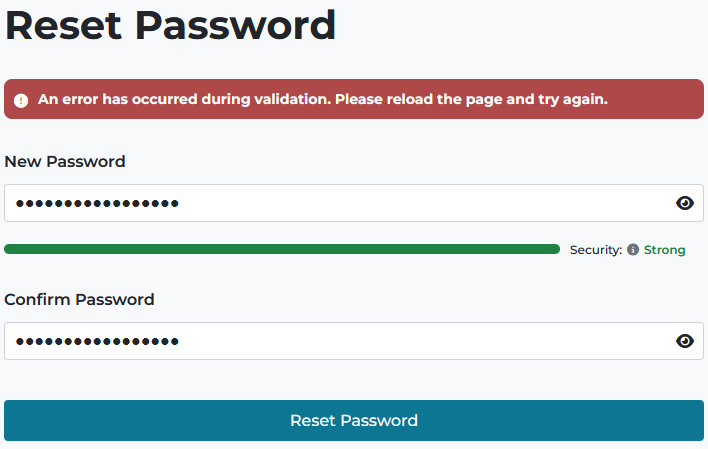
I have logged into TinyURL.com MANY times using Firefox. Now, I get a Cloudflare Validation Error when trying to do so (see attached screenshot/snip).
This was done in Troubleshooting mode, but is the same in standard mode, though I have no extensions enabled. I've tried turning Protection Tracking off; no luck. - We use ZoneAlarm, but the Web Secure functions are all disabled. - I have the same issue on 2 PC's, one Windows 10 and the other Windows 11, 64-bit. - I'm on FF release 150.0.2 - 64-bit, and both Windows installs are fully updated and kept that way. - I've reached out to TinyURL in hopes of resolving the issue. They suggested many of the above steps but not resolved this issue. - HOWEVER, I've found that login via Google Chrome IS seamless - no issues.
What is it with Firefox that it's having issues with the Cloudflare "Human" check? I've checked the Cloudflare site; all conditions are good, and this very setup passed the "Turnstile" check.
FF is my #1 preferred browser, so please look into this. I see that others have posted similar issues over multiple years here (but a search of support articles didn't find one . . .)
Thanks,
All Replies (5)
(I'm not familiar with the TinyURL errors — but you verified with them this error attached is directly related to Cloudflare bot protections and was not caused by anything else like network conditions, certificates, DNS etc. besides just fingerprinting protections?)
How does https://browser-compat.turnstile.workers.dev/ look for you?
(There's also https://challenges.cloudflare.com to verify you can connect to that host at all…)
Can you please clarify the timelines — as the post mentions release 150.0.2 but the question was submitted from 151.0 … I'm trying to eliminate a change in fingerprint signature that landed in v151 (but also might have been flipped remotely https://bugzilla.mozilla.org/show_bug.cgi?id=2034019#c35 — if you feel like flipping it back and trying again? — but don't forget to disable the cipher back later if no effect, to actually not have yet another non–matching signature for 151+…)
JBR: Turnstile results attached - all looks good to me.
Yes, the Cloudflare link takes me to that site (but no options to go any further there).
I apologize, "150.0.2" should be "151.0.2". My bad; sorry for the confusion.
I don't think I see where the BugZilla thread is relevant to Cloudflare. For this troubleshooting, I changed some security settings, but believe I changed them back -- they didn't affect the ability to login to TinyURL. I still can't login there w/Firefox 151.0.2, 64-bit, Win 10.
Thanks, Ron Klassen

If it opens that's enough validation. And the checks also look good. You might need to liaise with TinyURL a bit more, as there's not much more you can validate on your side.
They might tell you to open inspector/console to capture if the failed logins coincide with some specific errors appearing in the Network pane, with some specific endpoints and error codes — but that will be coming from their app so they will know what to look for…
(The version double check was purely to eliminate that change that landed a) in v150.0.3 and v151.0 specifically, b) around 2026-05-01 remotely for everyone. If these dates do not coincide with your issues it's not affected by it. The impact is a different signature observed by similar bot protections, so that's why I mentioned it, but it's been set that way for a subset of users for a long time without issues. If you can pass the turnstile page without errors, they're fine with it anyways.)
JBR:
OK, man, thanks. TinyURL more or less threw their hands up, but I'll post your thoughts back to them (anonymously) in case it jogs a thought.
Thanks for the efforts and thoughts. Technology: It's really great when it really works!
Ron Klassen
I mean, depending on how you're familiar with how those things work, you can check out https://developer.mozilla.org/en-US/docs/Learn_web_development/Howto/Tools_and_setup/What_are_browser_developer_tools what that thing is, with some details in https://firefox-source-docs.mozilla.org/devtools-user/ — and use the Network pane: https://firefox-source-docs.mozilla.org/devtools-user/network_monitor/ to see if there's any "sea of red" coming back when you get the validation error — that will show you where that comes from, and with what status code etc. — but all that info might eventually only be useful for the tinyurl folks as only they know what those services do on their side.
Feel free to make some screen shots if you find any interesting error reponses that would crop up just as you get the login failure and attach them here — but honestly I don't think the screen you attached originally, the validation issue trying to change password to a new one, is related at all to what was in the original post ("I get a Cloudflare Validation Error when trying to do so") — how you'd connect these two, or was there some other error that's not captured in the screenshot above to tell it's their turnstile validation rejected or timed out?
And, alas, you mention Troubleshoot mode is the same result and your antivirus has web content stuff disabled, but still a) I'd try turning that ZoneAlarm off completely for a bit to test as it can still intercept the HTTPS and changing the security signature around even with prefs flipped off, b) create a temporary new profile to eliminate any existing fingerprints from these third parties, and try the same flow from completely blank slate.