


Search with an envelope to address

I have a domain so any email I use comprises of name@mydomain.co.uk
In the past I have given an email address to some dodgy enterprises such as Abbey National plc, and so I get loads of spam to abbey@mydomain.co.uk
It is an utter pain that many spammers use a throw away or random To: address but because the envelope email is abbey@mydomain.co.uk I get to receive it and there is no easy way of searching a folder to find matches to "envelope to".
Similarly it seems impossible to construct filters for an "envelope to" address.
Any ideas?
All Replies (2)
Customize the list of header fields. Either in filters or in the find option (Shift+Ctrl+F) as the customizations are shared between the two.
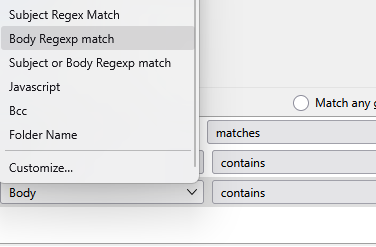
Add your Envelope to:
Note I also have he filtaQuila addon installed so your list will not match that in the image, but the customize option is universal. https://addons.thunderbird.net/en-US/thunderbird/addon/filtaquilla/
Many thanks for the idea. It works.
Envelope-to is ubiquitous with spammers so it is a shame I can't add an "Envelope-to" to a column for a folder. Just Recipient, From and Correspondents. Not even a "To".
Many thanks for the filtaquilla addon suggestion.