


Windows 10 reached EOS (end of support) on October 14, 2025. If you are on Windows 10, see this article.

Search Support

Avoid support scams. We will never ask you to call or text a phone number or share personal information. Please report suspicious activity using the “Report Abuse” option.

Learn More
Lolu chungechunge lwabekwa kunqolobane. Uyacelwa ubuze umbuzo omusha uma udinga usizo.
Okugcinwe kunqolobane

Dark mode link colors

Armadillo

Hello Development team, I am a long-time user of the Thunderbird e-mail client, having used it since it was Netscape Communicator. I have suffered from many upgrades that did not work well with my style of communication. However, the disappointing upgrade events using TB have been well overridden by the successful use of the overall e-mail client. Today’s topic is the latest upgrade, 140.0.1esr. The message page in dark mode shows darker links and text than it did using the add-on (Dark Mode). I have lost the ability to control text colors and the link status colors. I do not want to wander into the Config Editor to try and correct the linking status with a custom CSS entry. I have discovered the switch on the message panel to disable the “Dark Message Board”. I don’t like this method. I prefer a dark background and the ability to customize the message and link status colors while reading my messages.
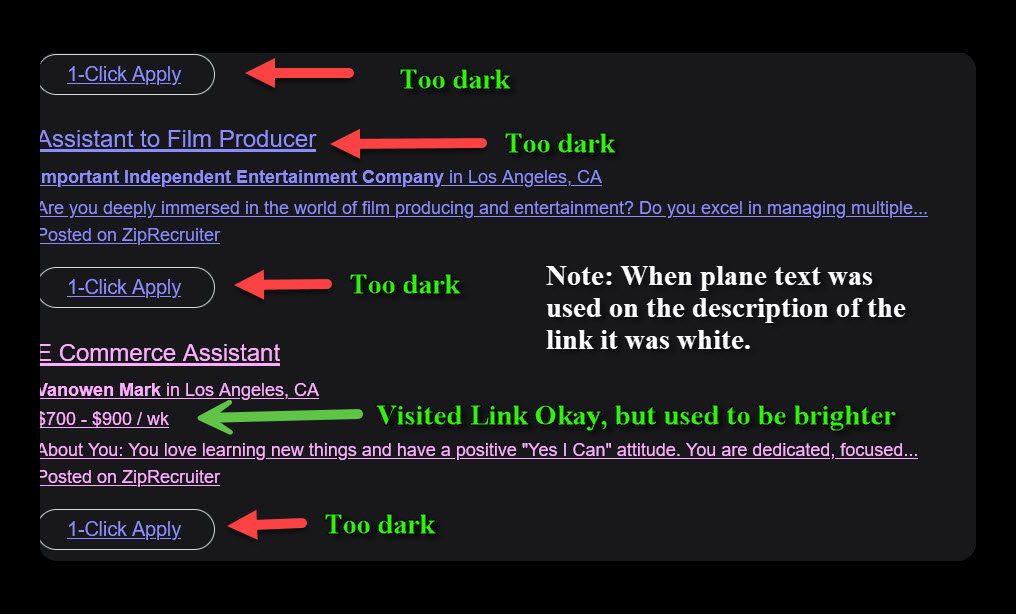
Hello Development team, I am a long-time user of the Thunderbird e-mail client, having used it since it was Netscape Communicator. I have suffered from many upgrades that did not work well with my style of communication. However, the disappointing upgrade events using TB have been well overridden by the successful use of the overall e-mail client. Today’s topic is the latest upgrade, 140.0.1esr. The message page in dark mode shows darker links and text than it did using the add-on (Dark Mode). I have lost the ability to control text colors and the link status colors. I do not want to wander into the Config Editor to try and correct the linking status with a custom CSS entry. I have discovered the switch on the message panel to disable the “Dark Message Board”. I don’t like this method. I prefer a dark background and the ability to customize the message and link status colors while reading my messages.
Ama-screenshot ananyekiwe

All Replies (1)