


Stop automatic updates

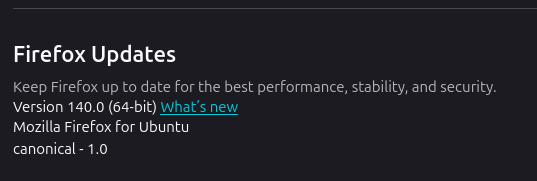
Hi, can someone please to me how to turn off automatic updates on Firefox Version 140.0 (64-bit)? Firefox's own support page, "https://support.mozilla.org/en-US/kb/firefox-options-preferences-and-settings?as=u&utm_source=inproduct", is incorrect. It states that, "Firefox Updates Here you can check your update history or change update settings for Firefox.", but you can not change the update setting, (see attachment).
It is really annoying it updates while you are using it, ruining your experience as you can no longer refresh tabs or open new ones forcing you to restart it.
All Replies (3)
You need to go to Tools -> Settings -> General Tab.
Scroll down to the Firefox Updates section and make sure Check for updates but let you choose to install them is selected and Not Automatically install updates (recommended).
I've had that selected forever and it's never automatically updated on me.
When you install Firefox from a package manager, it usually has been modified so that update timing is controlled by the package manager rather than by Firefox itself. (As a Windows person, I'm not familiar with the workarounds for different Linux builds.)