


Persistent tab open

Hi,
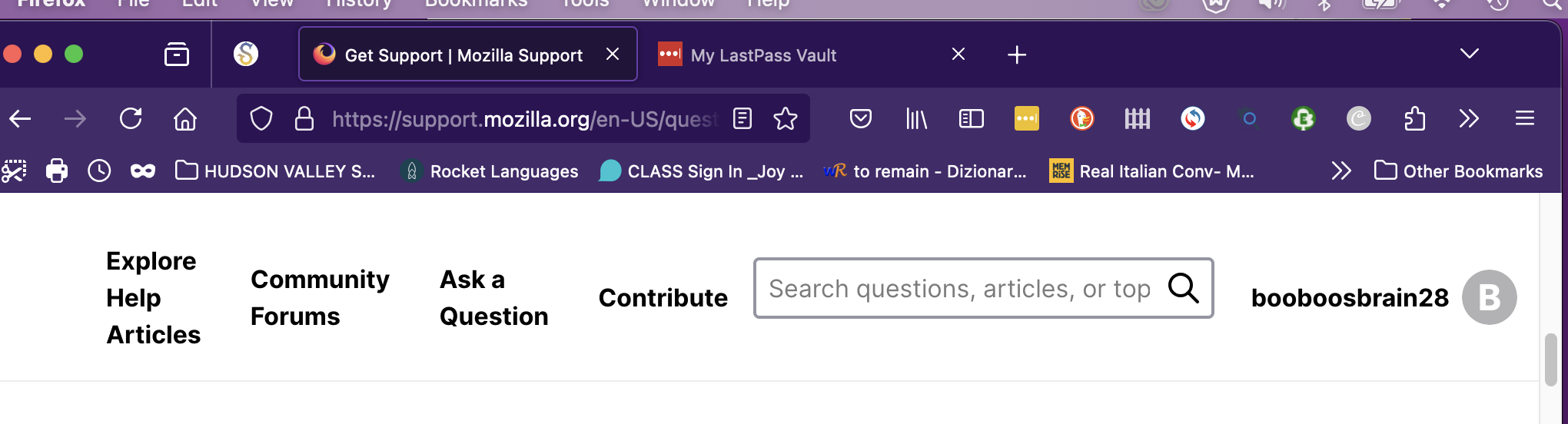
I cannot seem to close a tab, usually the last one I opened, in my browser window. It remains at the upper left hand corner of the browser. Please note the tab in the attached image.
How do I close this window and prevent this behavior again?
Many thanks,
Lisa D
Isisombululo esikhethiwe
Hi Lisa, the one with the "S" on it? I think it's a pinned tab. Try right-clicking (one button: Ctrl+clicking) the "S" and look for "Unpin tab" to turn it back into a regular tab.
As for how that or other tabs are getting pinned, I'm not sure.
Funda le mpendulo ngokuhambisana nalesi sihloko 👍 1All Replies (3)
Isisombululo Esikhethiwe
Hi Lisa, the one with the "S" on it? I think it's a pinned tab. Try right-clicking (one button: Ctrl+clicking) the "S" and look for "Unpin tab" to turn it back into a regular tab.
As for how that or other tabs are getting pinned, I'm not sure.
THANK YOU!!!
Note that you can close a pinned tab via the right-click context menu or via a middle-click with the mouse, only if you use the keyboard then you get moved to the first unpinned tab.