


Windows 10 reached EOS (end of support) on October 14, 2025. If you are on Windows 10, see this article.

Search Support

Avoid support scams. We will never ask you to call or text a phone number or share personal information. Please report suspicious activity using the “Report Abuse” option.

Learn More

Lolu chungechunge lwabekwa kunqolobane. Uyacelwa ubuze umbuzo omusha uma udinga usizo.

Container tabs not confirming any more

  • 1 baphendule
  • 0 zinale nkinga
  • 162 views
  • Igcine ukuphendulwa ngu Ryan Johnson
  • Kusonjululiwe

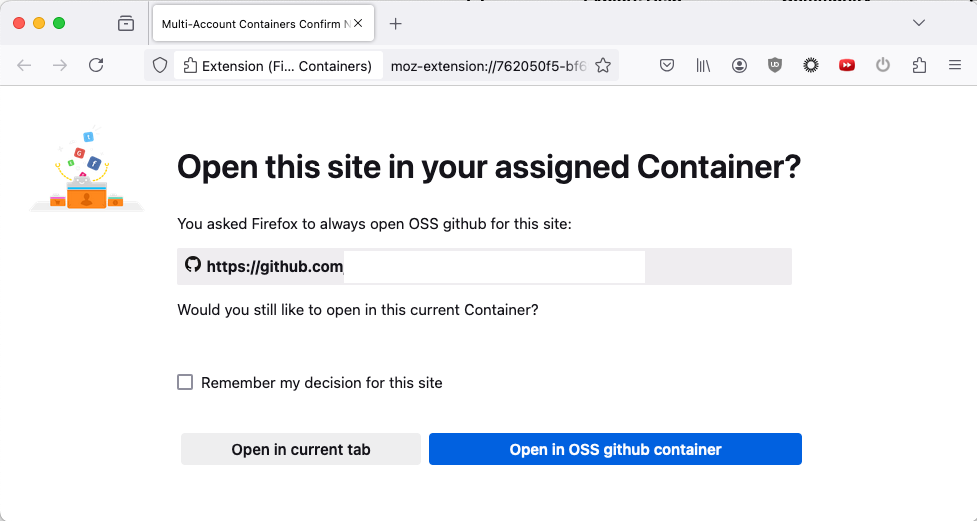
I have been using container tabs to juggle my corporate and personal github accounts. Until very recently, clicking a link from another app (email, etc) would start to open a new tab and then pop up a dialog asking me to confirm which container to use (see first attachment).

Unfortunately, now when I click on links it just loads straight to my "OSS github" container, which naturally produces a 404 error because my personal github account doesn't have access to the corporate repo (see second attachment).

At first, I thought I had accidentally clicked the "remember my decision" box. But the confirmation dialog still works if I open a new tab and paste the link in the address bar. It just doesn't work when other apps try to open a link in Firefox.

Is the new behavior intentional? Or did something accidentally break?

I have been using container tabs to juggle my corporate and personal github accounts. Until very recently, clicking a link from another app (email, etc) would start to open a new tab and then pop up a dialog asking me to confirm which container to use (see first attachment). Unfortunately, now when I click on links it just loads straight to my "OSS github" container, which naturally produces a 404 error because my personal github account doesn't have access to the corporate repo (see second attachment). At first, I thought I had accidentally clicked the "remember my decision" box. But the confirmation dialog still works if I open a new tab and paste the link in the address bar. It just doesn't work when other apps try to open a link in Firefox. Is the new behavior intentional? Or did something accidentally break?
Ama-screenshot ananyekiwe

Isisombululo esikhethiwe

Update: It seems to be working again after updating Firefox from 132.0.0 to 132.0.1.

Funda le mpendulo ngokuhambisana nalesi sihloko 👍 0

All Replies (1)

Isisombululo Esikhethiwe

Update: It seems to be working again after updating Firefox from 132.0.0 to 132.0.1.