


Calendar window upper toolbar to synchronize etc

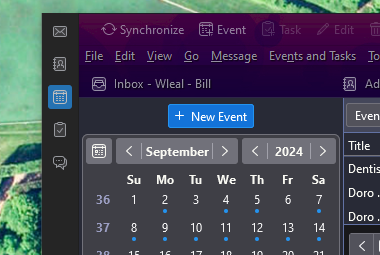
I have two installs of Thunderbird on Windows. On a calendar window, one of them has an upper toolbar with "Synchronize Event Task Edit Delete" options. See the attachment. On the other install, that upper toolbar is not present, and I do not know how to enable it.
Any advice is appreciated.
I have two installs of Thunderbird on Windows. On a calendar window, one of them has an upper toolbar with "Synchronize Event Task Edit Delete" options. See the attachment. On the other install, that upper toolbar is not present, and I do not know how to enable it.
Any advice is appreciated.
Isisombululo esikhethiwe
Open the Calendar tab, right-click the Menu Bar or Unified Bar, Customize..., drag the Synchronize or other buttons onto the toolbar, Save.
Funda le mpendulo ngokuhambisana nalesi sihloko 👍 0All Replies (1)
Isisombululo Esikhethiwe
Open the Calendar tab, right-click the Menu Bar or Unified Bar, Customize..., drag the Synchronize or other buttons onto the toolbar, Save.