


Scrolling with trackpad causing box to popup in Firefox 54

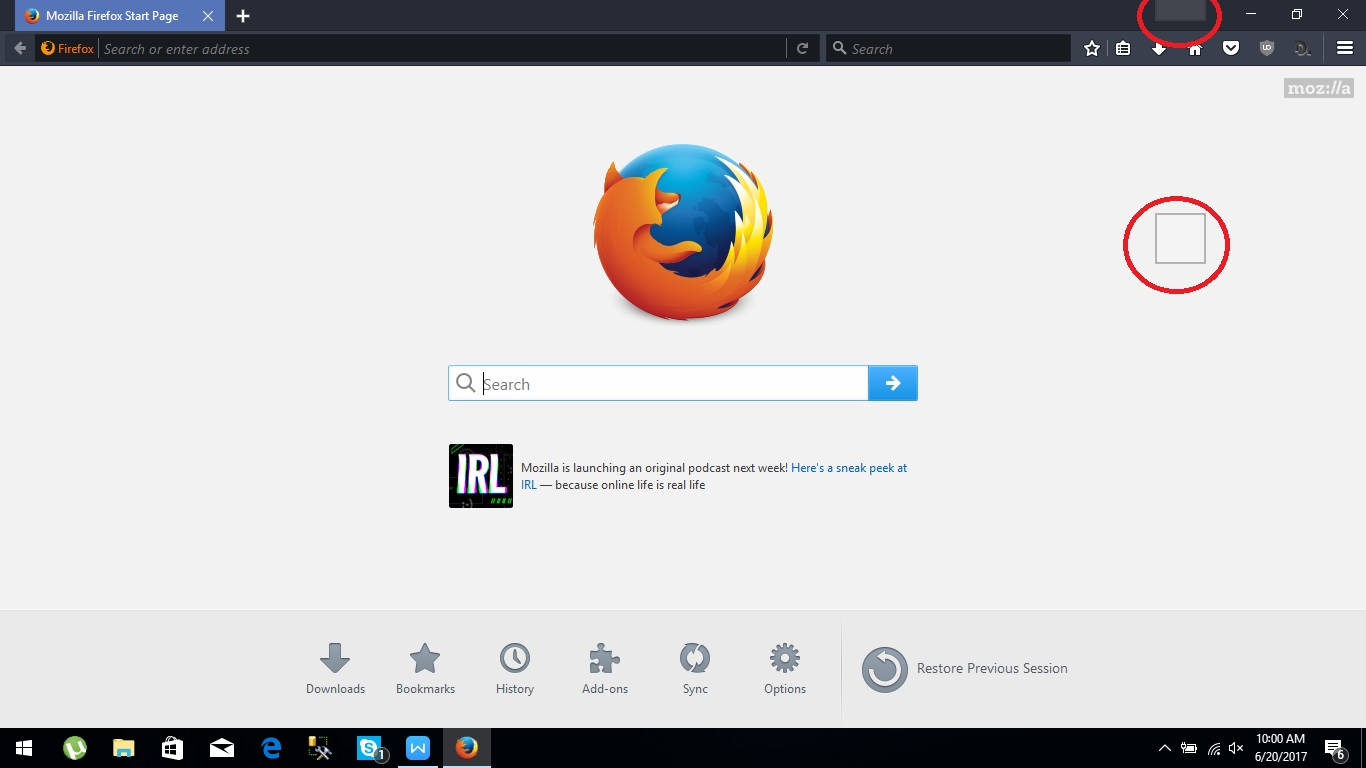
I don't know what happened on my Firefox, i can't scroll using my trackpad, with the recent update 54, i can scroll, but it still showing box if i scrolling in page
I have tried many solution on the forum, none of them worked out. disabling graphics accelator, smooth scrolling, auto scrolling, etc.
please help me Firefox team
- on my screenshot it show on the red circle that i marked, every single time i scroll within page the box show up
have tried another browser, everything fine, only on firefox
I don't know what happened on my Firefox, i can't scroll using my trackpad, with the recent update 54, i can scroll, but it still showing box if i scrolling in page
I have tried many solution on the forum, none of them worked out.
disabling graphics accelator, smooth scrolling, auto scrolling, etc.
please help me Firefox team
* on my screenshot it show on the red circle that i marked, every single time i scroll within page the box show up
have tried another browser, everything fine, only on firefox
All Replies (2)
hi, unfortunately there are some issues with scrolling on particular acer devices - https://bugzilla.mozilla.org/show_bug.cgi?id=1345355
philipp said
hi, unfortunately there are some issues with scrolling on particular acer devices - https://bugzilla.mozilla.org/show_bug.cgi?id=1345355
WOW, thanks a lot dude
layers.async-pan-zoom.enabled set to false it solve the problem on about:config