how to autofill sender e-mail addresses for address book

I have a new laptop on which I have re-installed Mozilla Thunderbird. I my previous PC, when typing e-mail address of known contacts I was offered the possibility of auto-filing. what should be done to activate same in my new laptop running windows 10 home thank you Salim
All Replies (3)
You just type part of an address. If what you type matches any entries in Thunderbird's Address Book, it shows them to you.
If this isn't happening, then you need to check what is in your Address Book.
Have you actually moved your profile to the new machine?
Dear Team I have tried tying the address but the auto fill does not work Can I know with which address book Is the matching done; I have the following address books in the Thunderbird application All address book comprised of 3 sub folders PErsonal Address book Antrix (our company name ) address book Collected address book
which one is taken as default?
I have tried to move my contacts form one folder to another but its not allowed No I have not moved my profile to the new machine please advise rgds
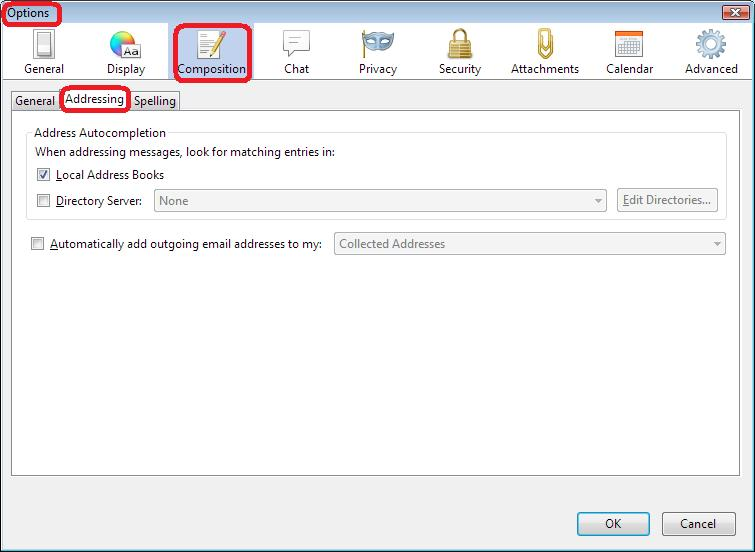
Please check to see if you have the following selected:
'Menu icon' > 'Options' > 'Options' > 'Composition' > 'Addressing' tab
When addressing messages, look for matching entries in: Select: 'Local Address Books' this will look up entries in any Thunderbird Address Book eg: Personal Address Book.
Click on OK
see image as help