Is it possible to Archive by folder, rather than selecting each email

I do project work, sort email by project & want to keep the project folders intact, not split up by Year
Isisombululo esikhethiwe

I think that is the default. At least on the account I added yesterday that is what it shows and I have not changed anything
Funda le mpendulo ngokuhambisana nalesi sihloko 👍 0All Replies (3)
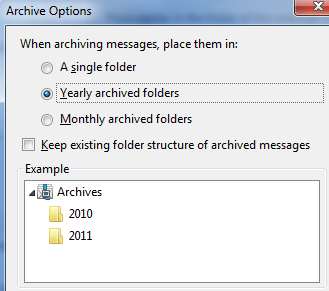
Right click the account in the folder tree and select settings then chose copies and folders. Click the archive options button Select keep existing folder structure
Hello Matt, Thank you for responding. I know for sure that I had selected 'keep folder structure,' so no problem there, worked perfect.
Bonehead here had apparently selected Option #2, (year) rather than Option # a single folder). I changed the setting per your directions, tested it and walla, problem solved.
Is 'File by Year' the default TB setting?
This is how it appears in Settings <enter> Copies and Folders <enter> Archive Options <enter> When Archiving files, place in: A single folder File by Year File by Year_Month <OK, enter>
Isisombululo Esikhethiwe
I think that is the default. At least on the account I added yesterday that is what it shows and I have not changed anything