


Firefox closing unexpectdly?

It happened twice already today. I was just watching a youtube video (its not youtube, I know because the other day it closed and I wasn't on youtube) and it closed. I don't know what could be wrong. It was working fine two days ago.
When it closes it doesn't say "there was a crash" or "re-open all your tabs that were closed"
I cleared my cache/download and browser history/ and cookies already.
I don't have any viruses, I already scanned. I scan daily anyways.
I have the latest version of Firefox.
I have all my plugins up to date.
I don't really have any extensions or add-ons.
所有回覆 (2)
We're sorry to hear that Firefox is crashing. In order to assist you better, please follow the steps below to provide us crash IDs to help us learn more about your crash.
- Enter about:crashes in the Firefox address bar and press Enter. A Submitted Crash Reports list will appear, similar to the one shown below.
- Copy the 5 most recent Report IDs that start with bp- and paste them into your response here.
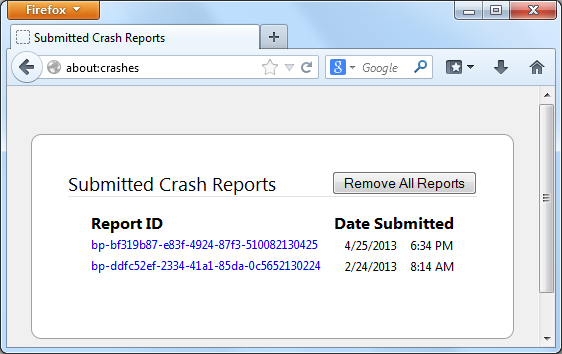
Thank you for your help!
More information and further troubleshooting steps can be found in the Troubleshoot Firefox crashes (closing or quitting unexpectedly) article.
Hi SpilledTea,
If the crash does not happen again it may have been a flash thing? There were reports of watching videos on youtube, but not alot were affected.
If it continues please try to disable flash acceleration and provide some report examples :-) Some problems with Flash video playback can be resolved by disabling hardware acceleration in your Flash Player settings. (See this article for more information on using the Flash plugin in Firefox).
To disable hardware acceleration in Flash Player:
- Go to this Adobe Flash Player Help page.
- Right-click on the Flash Player logo on that page.
- Click on Settings in the context menu. The Adobe Flash Player Settings screen will open.
- Click on the icon at the bottom-left of the Adobe Flash Player Settings window to open the Display panel.
The image "fpSettings1.PNG" does not exist.
- Remove the check mark from Enable hardware acceleration.
- Click Close to close the Adobe Flash Player Settings Window.
- Restart Firefox.
This Flash Player Help - Display Settings page has more information on Flash Player hardware acceleration, if you're interested.
Does this solve the problem? Let us know.