


Why does FF spend so much CPU on google search results?

I have the problem that Firefox spends more than 10% of CPU on displaying a static webpage like google search results. I am running Firefox on a late 2012 MacBook Pro and the constant use of so much CPU drains the battery and produces a lot of heat after a while.
Steps to reproduce: 1. Start Firefox in safe mode, disable all extensions 2. Enter "why does ff spend so much cpu on google search results" into the address bar 3. Observe how the CPU usage of Firefox increases to a steady 10%
Additional information: It seems that a lot of other users experience the same problem too, e.g., https://support.mozilla.org/en-US/questions/954376
https://support.mozilla.org/en-US/questions/960806
https://support.mozilla.org/en-US/questions/957512
However, the routine answer to their questions has always been to restart Firefox in safe mode, disable all plugins, etc, etc. I have tried all that, nothing helps.
Workaround: For me, the problem only occurs on the google search results page. I do not know what is special about this particular webpage and why displaying it needs so much CPU. It could be that Firefox uses a lot of CPU on other static webpages as well. However, a simple cure to my problems (for the moment) consists in switching to some other website when Firefox is idle. CPU usage will drop below <1% almost immediately after that.
被選擇的解決方法
Hi klopps, I don't get that on Windows 7 (screen shot attached; tried both logged in and logged out).
Google does occasionally run experiments on its results page causing people to have different displays and/or different behavior. Logging out and clearing all your Google cookies may get you back to a default experience, or maybe not, they do not announce these things.
If you want to try it:
While viewing a page on the site, either:
- right-click and choose View Page Info > Security > "View Cookies"
- Tools menu > Page Info > Security > "View Cookies"
In the dialog that opens, you can remove all your Google cookies individually.
Then when you reload, bypass Firefox's cache using Command+Shift+r.
Regarding the 3 threads you linked, it seems that each has a unique issue; there doesn't seem to be a single explanation that applies to all of them.
從原來的回覆中察看解決方案 👍 1所有回覆 (9)
Hello,
The Reset Firefox feature can fix many issues by restoring Firefox to its factory default state while saving your essential information. Note: This will cause you to lose any Extensions, Open websites, and some Preferences.
To Reset Firefox do the following:
- Go to Firefox > Help > Troubleshooting Information.
- Click the "Reset Firefox" button.
- Firefox will close and reset. After Firefox is done, it will show a window with the information that is imported. Click Finish.
- Firefox will open with all factory defaults applied.
Further information can be found in the Refresh Firefox - reset add-ons and settings article.
Did this fix your problems? Please report back to us!
Thank you.
I have done a reset of Firefox but the problem persists. I am wondering if anybody else can reproduce this behavior?
Does it have any effect if you disable JavaScript temporarily after the page has loaded?
- Firefox > Preferences > Content
Note that if you reset Firefox then a new profile is created and some of your data (bookmarks, history, cookies, passwords, form data) is automatically imported and your current profile will be moved to the desktop (Old Firefox Data).
Is is possible that importing that data is carrying over the problem.
Create a new profile as a test to check if your current profile is causing the problems.
See "Creating a profile":
- https://support.mozilla.org/kb/profile-manager-create-and-remove-firefox-profiles
- http://kb.mozillazine.org/Standard_diagnostic_-_Firefox#Profile_issues
If the new profile works then you can transfer some files from an existing profile to the new profile, but be careful not to copy corrupted files.
Hi cor-el,
thank you for your advice! After disabling JavaScript the problem disappears.
This means that JavaScript is causing the high CPU usage of Firefox. However, if I do a search with Chrome and display the search results, the CPU usage gets nowhere as high. I have checked the preferences and verified that JavaScript is enabled in Chrome. Only Firefox spends so much CPU on displaying google search results.
So the real question is: Why does FF need so much CPU to display a static website when JavaScript is enabled?
選擇的解決方法
Hi klopps, I don't get that on Windows 7 (screen shot attached; tried both logged in and logged out).
Google does occasionally run experiments on its results page causing people to have different displays and/or different behavior. Logging out and clearing all your Google cookies may get you back to a default experience, or maybe not, they do not announce these things.
If you want to try it:
While viewing a page on the site, either:
- right-click and choose View Page Info > Security > "View Cookies"
- Tools menu > Page Info > Security > "View Cookies"
In the dialog that opens, you can remove all your Google cookies individually.
Then when you reload, bypass Firefox's cache using Command+Shift+r.
Regarding the 3 threads you linked, it seems that each has a unique issue; there doesn't seem to be a single explanation that applies to all of them.
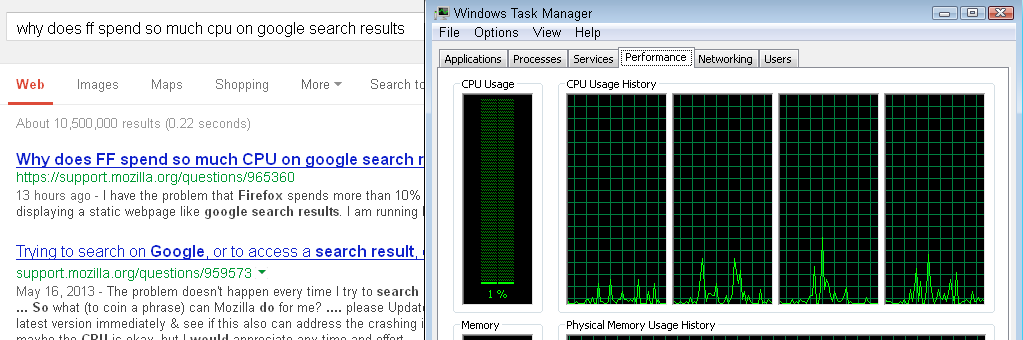
Hi jscher2000,
removing all my Google cookies and then bypassing Firefox's cache using Command+Shift+r also solved the problem for me.
Although Firefox will again spend much CPU on displaying the search results page the next time you perform a search and do not block the cookies, I have tagged the problem as solved since I know now where the high CPU usage is coming from and that it really does not seem to be Firefox's fault.
EDIT:
If Google really runs experiments on their results page and if they were evil enough, then why do they not install a JavaScript that will cause Firefox to use 100% CPU and finally crash? I mean, the average user will blame Firefox for this and will switch to Chrome then, where the high CPU usage does not occur.
Is it really possible to install JavaScript on a webpage that will only run if a certain browser is used? If yes, I would predict that Chrome will be the fastest browser in the future simply because Google intentionally can slows all its competitors down.
由 klopps 於 修改
Hi klopps, JavaScript knows what browser it is running in, but I'm doubtful about a conspiracy here... if you want to block JavaScript on Google, you could try the YesScript extension. This will return you to the pre-Instant Prediction era, but I'm not sure you will miss out on a lot otherwise. Oh wait, maps probably won't work. Hmmm...
I have this problem as well but I'm using Firefox 24 on Kubuntu (the KDE derivative of Ubuntu). The problem doesn't occur with Chrome nor the webkit browser Rekonq (ver. 2.3.x).
Hi molecule-eye, did you try the earlier recommendations in the thread? Any improvement, even temporary, or nothing?