


The drop down menus work intermittently; all add-ons are disabled.

When I run the cursor over a menu item; File, Edit, History, etc., the drop down menu does not drop. If I click on the menu items, the drop down menus will appear and then disappear. If I keep doing this for several seconds, the menus will appear when selected. I am having the same problem with this help screen when I do a right click with the mouse.
Thanks - Mike F.
被選擇的解決方法
In Firefox 4 and later Safe mode disables extensions and disables hardware acceleration.
Try to disable hardware acceleration.
- Tools > Options > Advanced > General > Browsing: "Use hardware acceleration when available"
If disabling hardware acceleration works then check if there is an update available for your graphics display driver.
從原來的回覆中察看解決方案 👍 4所有回覆 (7)
選擇的解決方法
In Firefox 4 and later Safe mode disables extensions and disables hardware acceleration.
Try to disable hardware acceleration.
- Tools > Options > Advanced > General > Browsing: "Use hardware acceleration when available"
If disabling hardware acceleration works then check if there is an update available for your graphics display driver.
Thanks a lot - disabling the hardware acceleration worked.
Mike F.
You're welcome
My MAC navigation for Tools is Web Search, Downloads, Add Ons, Set Up Sync, Web Developer, Page Info. Now what do I do. There is no Tools/Options. See attached. Thanks.
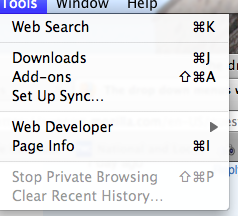
If you are not on Windows then instead of Tools > Options use:
- Linux: Edit > Preferences
- Mac: Firefox > Preferences
- Windows: Firefox > Options or Tools > Options
Press F10 if the menu bar is hidden on Windows and Linux
Thanks very much. But when I go to Firefox Preferences, then what? I've search for anything to disable hardware extensions and cannot find it. Appreciate your help.
heads up. it was my logitech mouse. disconnected that. everything works fine.