


Firefox Printing Issue – Landscape Labels Printing in Portrait Orientation

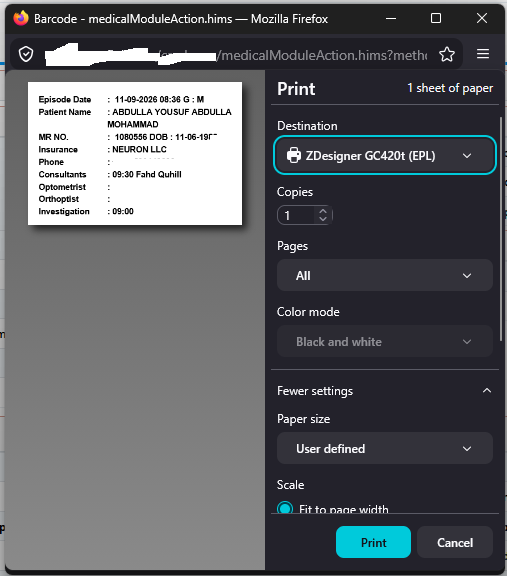
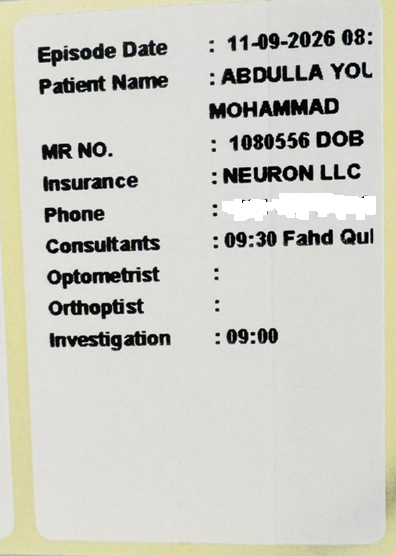
Dear Firefox Team, We are facing a printing issue with the latest version of Mozilla Firefox and would appreciate your help in resolving it. Our web-based healthcare application generates patient labels containing barcodes and patient information. These labels are designed to print in landscape orientation, and the Firefox print preview displays them correctly. However, when printing directly from Firefox, the labels are printed in portrait orientation, causing alignment and formatting issues. This issue was not present in an earlier version of Firefox, and printing was working correctly before. Unfortunately, we do not remember which Firefox version we were using at that time. We have observed the following: -The print preview displays the label correctly in landscape orientation. -Direct printing from Firefox prints the label in portrait orientation. -The same application prints correctly in Microsoft Edge and Google Chrome without any manual changes. - Saving the output as a PDF from Firefox preserves the correct landscape orientation. Since the issue appears to have started after a Firefox update and occurs only when printing directly, could you please investigate whether this is related to a change in Firefox's print handling or its interaction with printer settings? We would appreciate any recommended configuration or fix that would allow Firefox to retain the landscape orientation when printing directly. Thank you for your support. We look forward to your guidance.
所有回覆 (2)
Hi, that's possible if previously it was an older version of Firefox. Can you go to about:config and switch print.printer_YOUR_PRINTER_NAME.print_orientation to 1, where <YOUR_PRINTER_NAME> is the name of your actual printer, as Firefox knows it. You can likely find the correct string to use for that by searching in about:config for print.printer, assuming you've printed to the printer before.)
由 TyDraniu 於 修改
Okay, I see in your second screenshot that the printed text is rotated 90 degrees from what you intended.
There is something missing in your first screenshot: below "Destination" there is usually an "Orientation" selector to choose between Portrait and Landscale. The selector is missing from your screenshot, so we can't really tell how Firefox plans to print just based on the preview.
A couple typical reasons the selector might be missing are:
- The document is a PDF rather than a web page.
- The web page uses an @page size rule to fix the paper size, which implies a portrait or landscape orientation.
In the second case, you may want to try adding the following rule to match the orientation to your labels:
@page {
  page-orientation: rotate-right;
}
Note that page-orientation is not available in the Extended Support Release of Firefox 115 (for Windows 7 users), but if the problem has arisen in recent versions of Firefox, that might be fine.