


Windows 10 reached EOS (end of support) on October 14, 2025. If you are on Windows 10, see this article.

搜尋 Mozilla 技術支援網站

防止技術支援詐騙。我們絕對不會要求您撥打電話或發送簡訊,或是提供個人資訊。請用「回報濫用」功能回報可疑的行為。

了解更多
Open

Manage payment methods list missing

jbr replied
phil79

I have several saved cards in 152.0.1 (64-bit). When on a payment site the drop-down list shows up as expected, so the extensions.formautofill.creditCards.supportedCountries is correct and working (GB). Also address filling still works, as does saved passwords,

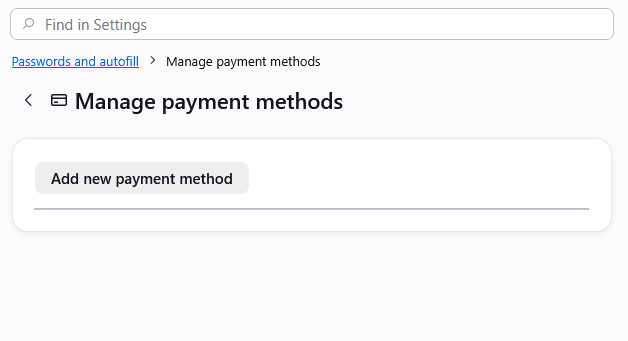
However if I try to "Manage payment methods" the resulting list in "about:preferences#managePayments" is blank. (see image)

I have tried toggling on and off "save & autofill" and restarting, but nothing helps.

Adding a new card works, and the new card appears in the drop-down list on a payment form, but still nothing appears to edit or remove in the settings. How an I edit this list?

PS: I have disabled ALL extensions.
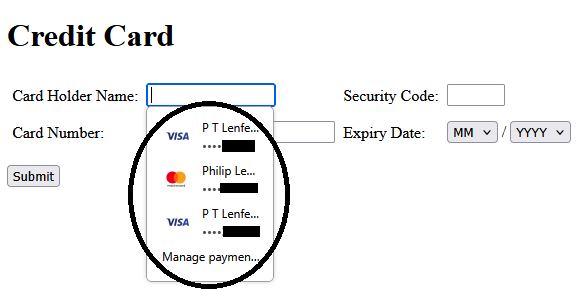
I have several saved cards in 152.0.1 (64-bit). When on a payment site the drop-down list shows up as expected, so the extensions.formautofill.creditCards.supportedCountries is correct and working (GB). Also address filling still works, as does saved passwords, However if I try to "Manage payment methods" the resulting list in "about:preferences#managePayments" is blank. (see image) I have tried toggling on and off "save & autofill" and restarting, but nothing helps. Adding a new card works, and the new card appears in the drop-down list on a payment form, but still nothing appears to edit or remove in the settings. How an I edit this list? PS: I have disabled ALL extensions.
附加的畫面擷圖

由 phil79 於 修改

所有回覆 (1)

When you restart to Use Troubleshoot Mode in Firefox is it still empty?

If you create a separate new profile to test this, and add any card there, is that visible in the list of the new profile settings?

問個問題

如果您還沒有帳號,您必須先登入帳號 來回覆文章。還沒有帳號的話,只能發問新問題