


Where is "Just go to about:config and switch browser.tabs.groups.enabled to false"? All I can find is that response when searching for a way to turn off tab grouping in Firefox.

That tab grouping "feature" really is too much like modern software developers' tendency to roll out a new "feature" and turn it on automatically no matter how annoying some users may find it. Some times when a mouse cursor goes too far and wanders into that tab zone, Firefox starts grouping tabs. Please allow us to turn the thing off.
選擇的解決方法
Hello
Tab groups in Firefox https://support.mozilla.org/en-US/kb/tab-groups
For information, https://connect.mozilla.org/t5/discussions/seeking-your-feedback-on-tab-groups/m-p/120395/highlight/true#M47167
Since the release of https://www.firefox.com/en-US/firefox/150.0/releasenotes
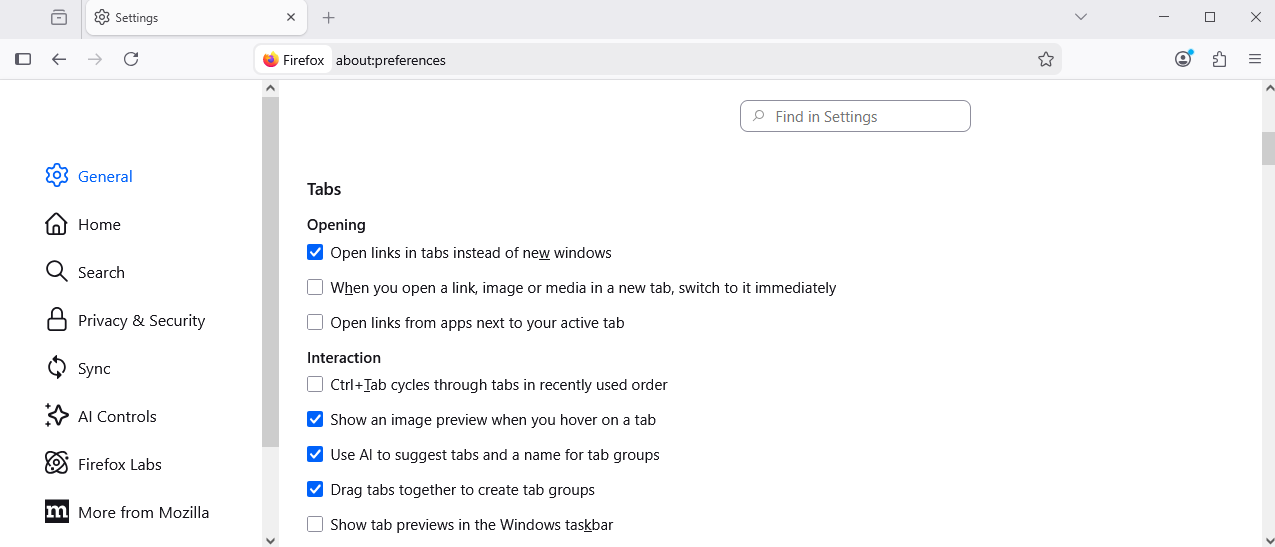
If you prefer creating tab groups from the context menu, you can now turn off drag-and-drop group creation in Settings > Tabs > Drag tabs to create tab groups
Uncheck, Drag tabs together to create tab groups
由 Agent virtuel 於 修改
所有回覆 (3)

"switch browser.tabs.groups.enabled to false"? All I can find is that response"
So have you tried that ?
UPDATE:
Yes just found it. Default was on ? Never noticed it was there, nor by the accident you refer to.
Well now it is 'false' :)
b.gregorythomas said
Where is "Just go to about:config and switch browser.tabs.groups.enabled to false"?
In the Location (address) bar type in about:config with a colon : and then in search bar about you can search for browser.tabs.groups.enabled
about:config is more for advanced users https://support.mozilla.org/en-US/kb/about-config-editor-firefox
Another about: url that is useful is about:about as it lists all about url's for that Firefox version.
選擇的解決方法
Hello
Tab groups in Firefox https://support.mozilla.org/en-US/kb/tab-groups
For information, https://connect.mozilla.org/t5/discussions/seeking-your-feedback-on-tab-groups/m-p/120395/highlight/true#M47167
Since the release of https://www.firefox.com/en-US/firefox/150.0/releasenotes
If you prefer creating tab groups from the context menu, you can now turn off drag-and-drop group creation in Settings > Tabs > Drag tabs to create tab groups
Uncheck, Drag tabs together to create tab groups
由 Agent virtuel 於 修改