


WHY THE HECK FIREFOX USES 16 GIGABYTES OF RAM??????????????????????????????

FIREFOX ... MMMMMMMMMMMMMMMMOOOOOOOOOOOOOOOOORRRRRRRRREEEEEEEEEEE THAN 16 GIGABYTES WITH ONLY 4 TABS OPENED. AND OF COURSE .... BROWSER FREEZES, NEED TO KILL FIREFOX TO STAR WORKING AGAIN ....
WHAT ARE YOU SMOKING THESE DAYS?
所有回覆 (4)
Unbelievable how Firefox is committing suicide in front of our eyes ... Is Firefox being already programmed by an AI LLM? Hi Claude! Your work is terrible ...
Hi
What add-ons do you have installed in Firefox?
Are you able to share the addresses of the websites that you have open in those tabs?
Hi Paul!
The situation is the following .... My full memory is 32GB (16GB RAM + 16GB SWAP) It used to be fine until a few weeks ago ... (began at 150.0.0 ?) Firefox keeps grabbing more and more memory, releasing nothing, no matter the loaded pages. After a few hours it reaches a point it has just eaten all the memory (RAM + SWAP). Then Firefox starts killing its tabs but still keeping ALL memory under its belly, rendering the system (Linux 22.3) unusable for all programs and itself ...
Extensions in use:
   Privacy Badger
   AddBlocker Ultimate
   Facebook Container
   Quant - Search engine and tracker blocker
   SingleFile
   Video DownloadHelper (not loading nothing at the time)
Thanks!
Good luck :-)
Hello,
Try disabling graphics hardware acceleration in Firefox. Since this feature was added to Firefox, it has gradually improved, but there are still a few glitches.
You will need to restart Firefox for this to take effect so save all work first (e.g., mail you are composing, online documents you're editing, etc.) and then perform these steps:
- Click the menu button
 and select Settings.
- Select the General panel.
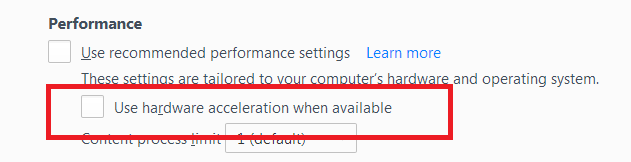
- Under Performance, uncheck Use recommended performance settings. Additional settings will be displayed.
- Uncheck Use hardware acceleration when available.
- Close Firefox completely and then restart it to see if the problem persists.
Did this fix your problems? Please report back to us!
If the problem is resolved, you should check for updates for your graphics driver by following the steps mentioned in these Knowledge base articles:
- Troubleshoot extensions, themes and hardware acceleration issues to solve common Firefox problems
- Upgrade your graphics drivers to use hardware acceleration and WebGL
Thank you.