


super slow response time

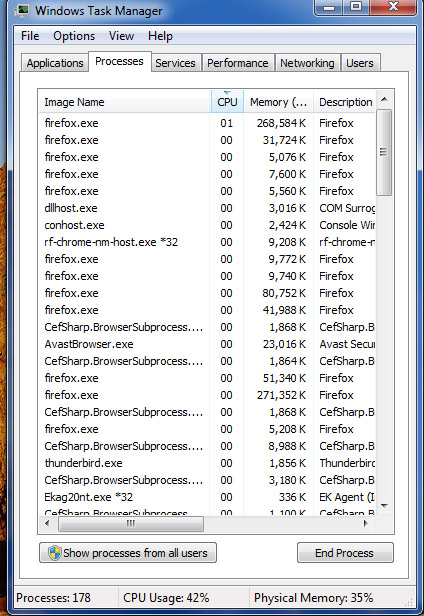
I've been using Fire Fox for decades, but lately it is so slow, I thought there was something wrong with my Windows 7 ultimate. I've done full Windows reboot, to no avail. Then I see the internet t hat FireFox is starting to implement AI. I thought that may be the issue, but after looking into it, looks like that isn't an option with my old Win 7 OS. So if that isn't the problem, how can I find out what is bogging Fire Fox down? I keep a watch on my CPU usage, and the usage is going nearly to 100%, when it used to barely go over 10%. When I check the actual CPU usage, it shows as many as 15 or more items tied to Fire Fox.
Is this all a result of continued use of Win 7? I'm planning to move to Linux, but that will take me some serious time and effort. Gerald
被選擇的解決方法
Show the performance tab. Did you try with Firefox in Troubleshoot Mode? https://support.mozilla.org/en-US/kb/diagnose-firefox-issues-using-troubleshoot-mode#search
Did you clear your browser cache? https://support.mozilla.org/en-US/kb/clear-cookies-and-site-data-firefox
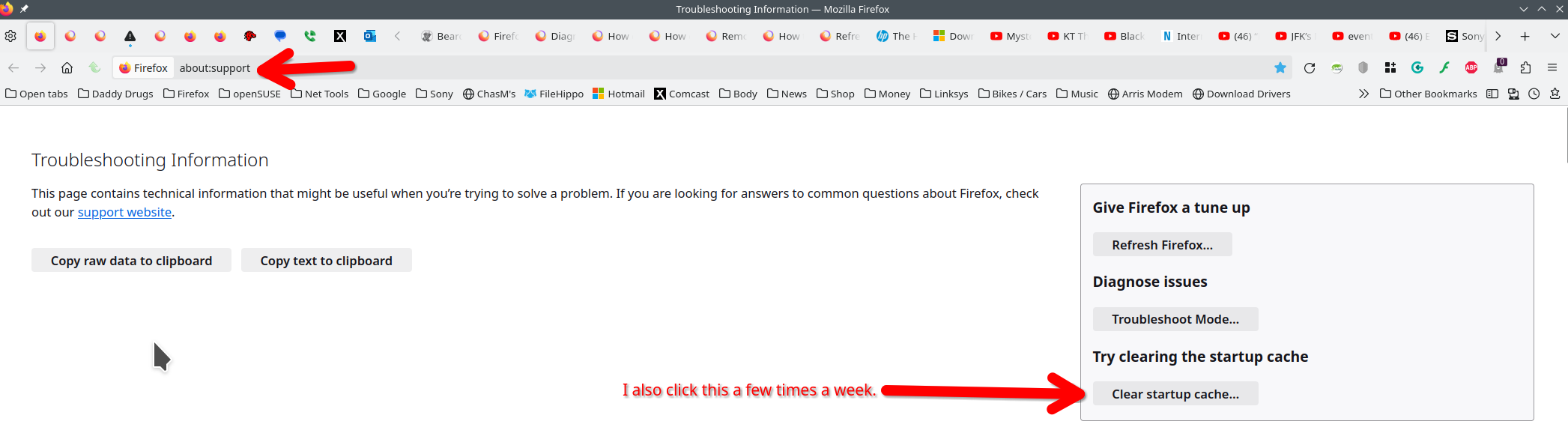
Also clear the browser startup cache. see screenshot
I have win7 and not seeing such issues.
從原來的回覆中察看解決方案 👍 1所有回覆 (4)
選擇的解決方法
Show the performance tab. Did you try with Firefox in Troubleshoot Mode? https://support.mozilla.org/en-US/kb/diagnose-firefox-issues-using-troubleshoot-mode#search
Did you clear your browser cache? https://support.mozilla.org/en-US/kb/clear-cookies-and-site-data-firefox
Also clear the browser startup cache. see screenshot
I have win7 and not seeing such issues.
It's a good idea to get linux up and running so that you can have both and just replicate what you do in windows on linux. WE ARE WAITING FOR YOU!
I never even knew of a way to trouble shoot. I went through all your suggestions, but my memory isn't good enough to remember the specifics as to what I changed. I did disable a couple addons when in trouble shoot mode, but too leery to clear the Web Browser. I could see a moderate improvement while in trouble shoot mode, and I think it is enough better until I can switch over to Linux. I like your idea of getting both up and running before any dismantling. Thanks for your responses. I feel a bit timid to dig too very far with out help. Gerald
gshantz said
Then I see the internet t hat FireFox is starting to implement AI. I thought that may be the issue, but after looking into it, looks like that isn't an option with my old Win 7 OS.
Not the way you think and it is said there going to be a AI killswitch. Depute that people want the AI stuff as an Extension instead anyways.
Firefox 115.31.0esr is based on the old Firefox 115.0 Release but with allowed security/stability fixes since. ESR channel versions is meant more for Enterprise users in mind as they like longer term stability. Though the Fx 115 ESR is a way for the EOL Windows 7, 8, 8.1 and macOS 10.12, 10.13, 10.14 OS to still get a secure Firefox version when Chrome/Chromium based browsers dropped support early 2023.
If you do either switch to or dual boot with a linux distro. I suggest to use a lighter desktop environment such as Xfce or Mate which is a continuation of the classic Gnome 2 compared to the heavy Gnome 3 and KDE, Though Xfce does not work well with Wayland at the moment as it was better with x11.
由 James 於 修改